Best Opal Alternatives in 2026: 7 Screen Time and App Blocker Apps Compared
By Soothfy Team ·
Looking for an Opal alternative? We compare the 7 best screen time and app blocker apps in 2026, including free options and a physical blocker, with real prices.
Opal promised to give you your time back: set rules, block distracting apps, and watch your Focus Score climb. It's one of the most popular screen time apps, with 4.7 stars from about 92,000 U.S. App Store reviews.
But Opal Pro is expensive (listed at
9.99 a month, $99.99 a year or $399 lifetime), its free plan allows just one rule, and some people find ways around it within a week (Habit Doom, Oct 2026). This guide compares the 7 best Opal alternatives in 2026, from free blockers to a physical device, and one option for when scrolling is really about stress.
Quick answer: the best Opal alternatives in 2026
🥇 Soothfy: best when scrolling is how you cope with stress, anxiety or ADHD overwhelm
ScreenZen: best free alternative
one sec: best gentle pause before apps open
Brick: best physical blocker, hardest to cheat
Freedom: best for phone and computer together
Jomo: best scheduled blocker for iPhone
Apple Screen Time: best built-in option
About Soothfy (who wrote this)
This guide is written by the team behind Soothfy, a mental health app for ADHD, anxiety, depression, stress, insomnia, OCD, PTSD, panic attacks and addictive habits. Soothfy is our product, so we say clearly where another app is the better pick. Download Soothfy on the App Store or Google Play.
Opal Alternatives Compared
App
How it stops you
U.S. rating
Price (U.S.)
🥇 Soothfy
Works on the urge itself
—
$49.99/yr (free trial)
ScreenZen
Pause + prompt
4.9 (≈54K)
Free (tips)
one sec
Breathing pause
4.8 (≈24K)
9.99/yr · $99.99 lifetime
Brick
Physical tap to block
4.9 (≈61K)
~$59 device, free app
Freedom
Cross-device schedules
4.5 (≈6K)
$39.99/yr
Jomo
Scheduled windows
4.8 (≈2.6K)
$29.99/yr · $99.99 lifetime
Apple Screen Time
Limits + downtime
Built in
Free
Opal (for reference)
Rules, limits, Hard Mode
4.7 (≈92K)
$99.99/yr · $399 lifetime
Ratings from the U.S. App Store (Nov 19, 2026); prices from Habit Doom comparisons (Oct 2026), which are published by a competing app. Check the App Store before buying.
Why People Look for an Opal Alternative
Price. $99.99 a year is a lot for a blocker.
Limited free plan. One rule isn't enough for most people.
Easy to bypass. Without Hard Mode (Pro only), it's tempting to switch blocks off.
Wanting cross-device blocking. Your laptop can be just as distracting as your phone.
The urge moves elsewhere. Block one app and the scrolling moves to another, because the reason behind it hasn't changed.
How We Chose
Each option reduces phone distraction, using a different mechanism
Free and one-time purchase options included
Ratings checked on the U.S. App Store today; prices from public comparisons
Soothfy is our app, and it isn't a blocker. If you only need to block apps, ScreenZen is the best free swap.
The 7 Best Opal Alternatives in 2026
1. Soothfy: Best When Scrolling Is How You Cope
Opal blocks the apps. But for many people, especially with ADHD or anxiety, scrolling isn't really about the app. It's an escape: from a task that feels too big, a feeling that's too much, or a brain that won't settle. Block Instagram and you'll often find yourself on YouTube instead. Soothfy works on what you're escaping from.
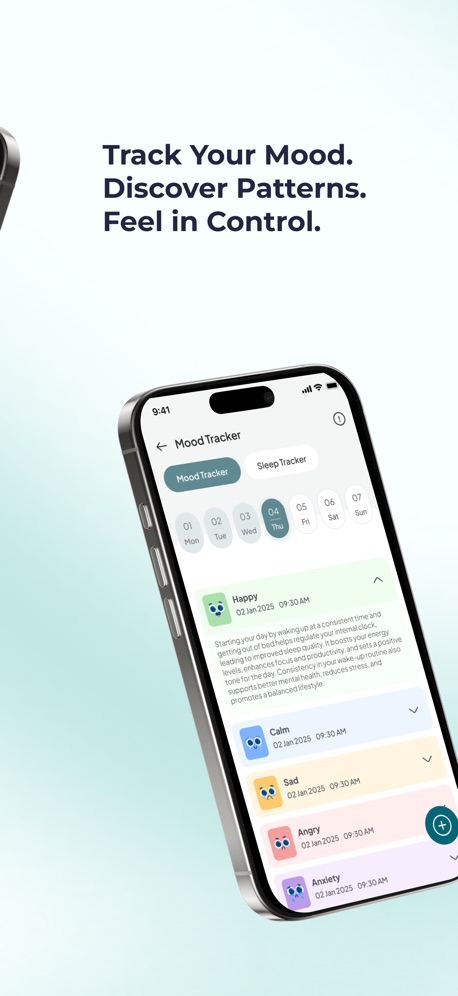
When you notice the urge to scroll, Instant Relief lets you tap how you feel, like overwhelmed, anxious or restless, and gives you 3 CBT exercises with a 2-minute timer. A personalized 30-day plan of 2- to 5-minute activities, tied to Anchor Habits, gives your hands and brain something better to reach for at the times you usually scroll. The mood and sleep tracker shows how late-night phone time affects your next day.
Compared with Opal: Opal adds friction to apps; Soothfy reduces the stress that sends you to them. Many people use a free blocker like ScreenZen plus Soothfy.
Key features
Instant Relief: pick your exact symptom, like overwhelm or a racing mind, and get 3 CBT exercises with a 2-minute timer
Personalized 30-day plan of 2- to 5-minute activities that adapts to your mood and energy
Anchor Habits: new habits tied to routines you already do, like making coffee
Mood and sleep tracker with weekly and monthly trends and reports for your doctor or therapist
Journal with text, voice notes and images
Pros
Works on the reason you scroll
Replaces scrolling with 2-minute habits
Mood and sleep tracking shows the impact
Cons
Not an app blocker; pair it with a free blocker
Pricing
Free to download with a free trial, then $49.99/year or $8.99/month (U.S.). Get it on the App Store or Google Play, or learn more at soothfy.com.
Best for
People who scroll to escape stress or tasks
ADHD with anxiety or overwhelm
Start with a 2-minute check-inA plan that adapts to you
Swap the scroll for 2 minutes of calm
Try Soothfy free: CBT relief for the moments you reach for your phone.
ScreenZen adds a pause before distracting apps open, with an "Is this important?" prompt and an optional Strict Block. It's free, supported by optional tips, and has 4.9 stars from about 54,000 U.S. App Store reviews, one of the highest-rated blockers available.
Compared with Opal: Most of what people use Opal for, free. Fewer schedules and reports.
Key features
Pause before opening apps
"Is this important?" prompt
Optional Strict Block
Open limits
Pros
Completely free
Very highly rated
Cons
Less polished reports than Opal
Pricing
Free; optional tips from about $5 to $40 (Habit Doom).
Best for
Anyone who wants Opal's core for free
3. one sec: Best Gentle Pause
one sec makes you take a short breath before an app opens, then asks if you still want to continue. It doesn't block, it interrupts the automatic reach. It has 4.8 stars from about 24,000 U.S. reviews.
Compared with Opal: Softer and cheaper; nudges rather than locks.
Key features
Breathing pause before apps open
Shows how often you try to open apps
Works on iPhone, Android and Mac
Pros
Gentle, not punishing
Cheap yearly plan
Cons
Easy to tap through when tired
Pricing
Free for one app; Pro $6.99/month, 9.99/year or $99.99 lifetime (Habit Doom).
Best for
People who open apps on autopilot
4. Brick: Best Physical Blocker
Brick is a small device you keep at home or work. Tap your phone on it to block chosen apps; to unblock, you have to tap it again. That physical step makes a big difference for many people. The app has 4.9 stars from about 61,000 U.S. reviews.
Compared with Opal: Harder to cheat because unblocking needs the device, and there's no subscription.
Key features
Tap to block, tap to unblock
Custom app lists
No subscription
Pros
Very hard to bypass
One-time cost
Cons
Hardware to buy
Can't unblock when you're away from it
Pricing
About $59 one-time for the device; the app is free (Habit Doom).
Best for
People who always find a way around software blocks
5. Freedom: Best for Phone and Computer Together
Freedom has blocked distractions since 2008 and syncs block sessions across Mac, Windows, iPhone and Android. You can schedule recurring focus sessions, like weekday mornings, so blocking happens without a decision. It has 4.5 stars from about 6,000 U.S. reviews.
Compared with Opal: Stronger across devices and cheaper per year, with less detailed phone analytics.
People distracted on their laptop as well as their phone
6. Jomo: Best Scheduled Blocker for iPhone
Jomo blocks chosen apps during set times, like work hours or bedtime, with a clean design and focus sessions. It has 4.8 stars from about 2,600 U.S. reviews but is iPhone-only.
Compared with Opal: Similar scheduling at a much lower price, but no Android app.
Key features
Scheduled blocking windows
Focus sessions
Screen time insights
Pros
Much cheaper than Opal
Cons
iPhone only
Pricing
Limited free version; $5.99/month, $29.99/year or $99.99 lifetime (Habit Doom).
Best for
iPhone users who want schedules for less
7. Apple Screen Time: Best Built-In Option
Screen Time is built into every iPhone. You can set daily app limits, downtime and content restrictions for free. On its own it's easy to bypass, but setting a passcode that a friend or partner holds makes it much stronger.
Compared with Opal: Free and already installed, but easy to ignore without a passcode.
Key features
App limits
Downtime schedule
Weekly reports
Pros
Free
No extra app
Cons
"Ignore Limit" is one tap away
Pricing
Free.
Best for
People who want to start without paying
Which Blocking Style Works for Your Brain?
Mechanism
How it feels
Best app
Works best if…
Pause
A few seconds to reconsider
one sec, ScreenZen
You open apps on autopilot
Schedule
Apps locked at set times
Jomo, Freedom
Your distraction follows a routine
Physical
Need a device to unblock
Brick
You always find workarounds
Hard lock
Can't undo until timer ends
Opal (Pro)
You need strict limits
Address the cause
Calm the urge first
Soothfy
You scroll to escape stress or tasks
Why We Scroll When We Don't Want To
Scrolling gives a fast, easy reward with no effort, which is exactly what a tired, stressed or bored brain looks for. For people with ADHD, the pull can be stronger, because starting a hard task is harder and quick rewards feel more compelling. The National Institute of Mental Health lists being easily distracted and avoiding tasks that need sustained mental effort among common ADHD symptoms.
That's why blockers work best with a plan for the moment you reach for your phone:
Notice the urge. What were you about to do, and how did you feel?
Name it. Bored? Anxious? Avoiding something?
Do a 2-minute swap. Breathe, stretch, drink water, or do the first tiny step of the task.
Decide. If you still want to scroll, set a timer and enjoy it guilt-free.
Mood + sleep trackerYour personal goals
A Simple Setup That Works
For most people, the most effective combination is cheap: a free blocker (ScreenZen or Apple Screen Time with a passcode), phone charging outside the bedroom, and one daily habit that replaces your biggest scroll window. If stress or ADHD overwhelm drive your scrolling, add Soothfy for 2-minute CBT relief and Anchor Habits.
Common Screen Time Mistakes
Blocking everything at once. Start with your one most distracting app.
Setting limits you'll resent. Zero social media often ends in a binge. Try a daily limit first.
Keeping the phone in bed. Charging it in another room is the single easiest win.
Ignoring what you do instead. If there's nothing to replace scrolling, you'll go back to it.
Changing apps every week. Pick one blocker and give it a month.
A 7-Day Reset
Day
Action
1
Check your Screen Time report and pick your top distracting app
2
Set up one blocker for that app
3
Move your phone charger out of the bedroom
4
Pick a 2-minute swap for the moment you'd usually scroll
5
Add a focus block during your most productive hour
6
Notice when the urge is strongest and how you feel then
7
Review: what helped, and what will you keep?
Key takeaways
Opal Pro is listed at $99.99/year or $399 lifetime, and the free plan allows one rule.
ScreenZen is the best free alternative; one sec offers a gentle pause for 9.99/year.
Brick is the hardest to cheat; Freedom blocks across phone and computer.
If you scroll to escape stress or overwhelm, Soothfy helps with the urge itself through 2-minute CBT exercises and Anchor Habits.
Final Verdict
To save money, choose ScreenZen. For a gentle nudge, one sec. For blocks you can't sneak around, Brick. For your laptop too, Freedom. And if scrolling is how you cope with stress or ADHD overwhelm, add Soothfy.
ScreenZen is the best free alternative, one sec is best for a gentle pause before opening apps, and Brick is best if you want a physical tap to unlock. Freedom is best for blocking across phone and computer. Soothfy is our pick if you scroll to escape stress, anxiety or ADHD overwhelm and want to work on that instead.
2. How much does Opal cost?
Opal has a free plan with one blocking rule. Pro is listed at 9.99 a month, $99.99 a year or $399 lifetime in the U.S., according to a comparison checked on October 10, 2026. Check the App Store for current prices.
3. Is there a free Opal alternative?
ScreenZen is free, with optional tips. Apple's built-in Screen Time is free, and one sec and Jomo have limited free versions.
4. Which Opal alternative is best for ADHD?
It depends on how you get pulled in. one sec's breathing pause interrupts automatic opening, ScreenZen's "Is this important?" prompt adds a moment to think, and Brick makes blocking physical. If scrolling is a way of avoiding hard tasks or feelings, Soothfy's 2-minute CBT exercises help with the cause.
5. What is Opal's Hard Mode?
Hard Mode is a block that can't be turned off until the session ends. It requires Opal Pro.
6. Does Apple Screen Time work as an Opal alternative?
Yes, for basic limits. It's free and built into iPhone, but it's easy to tap "Ignore Limit", so it works best if you set a passcode someone else knows.
7. What is Brick?
Brick is a small physical device. You tap your phone on it to block chosen apps, and tap again to unblock. Because the device stays in one place, unblocking takes real effort. It has 4.9 stars from about 61,000 U.S. App Store reviews.
8. Do app blockers actually reduce screen time?
They can, especially when they add friction before opening an app. They work best alongside new habits for the moments you'd normally scroll.
9. Which Opal alternative works on Android?
ScreenZen, one sec, Freedom and Brick work on Android. Jomo is iPhone-only, according to Habit Doom's comparison.
10. Why do I scroll even when I don't want to?
Scrolling is often a quick escape from boredom, stress or overwhelm. If that's you, try a 2-minute calming exercise or a small task instead. Soothfy's Instant Relief can help; download it on the App Store or Google Play.
This article is for information only and is not medical advice. Prices and features change often; check each provider's website or app store listing before you buy. Last updated November 19, 2026. Soothfy: soothfy.com