Forest Alternatives: The Best 7 Focus Apps in 2026
By Soothfy Team ·
Killing trees in Forest but still not getting work done? Here are the best Forest alternatives in 2026 for focus, planning and ADHD.
You plant a tree, put your phone face-down and tell yourself this time you'll focus. Twenty minutes later, the tree is still growing, but you've reread the same paragraph six times and your to-do list hasn't moved.
Forest is brilliant at one thing: keeping you off your phone. But phone distraction is only one reason focus falls apart. Not knowing where to start, time blindness, anxiety about the task and ADHD overwhelm can all stop you, even with the phone across the room.
In this guide we compare the 7 best Forest alternatives in 2026: what each one does well, where it falls short, what it costs, and who it's for.
Quick guide: the best Forest alternatives in 2026
- 🥇 Soothfy: best when anxiety, stress or ADHD overwhelm is what blocks your focus, with 2-minute CBT relief, Anchor Habits and a daily plan
- Flora: best free tree-growing focus timer
- Focus To-Do: best Pomodoro timer with tasks
- Structured: best visual day planner
- Session: best focus timer for desk work
- Tide: best focus sounds and timer
- Opal: best strict app blocker
How We Chose These Forest Alternatives
To build this list, we compared each app's U.S. App Store listing, features and current prices, and read App Store reviews to see what real users like and what frustrates them. We looked for apps that keep what people love about Forest, a simple, motivating way to focus, and add what it lacks, from task planning to help with the anxiety and ADHD that make starting hard.
Soothfy is our app. Where another app is the better pick for a need, we say so.
- Focus support: timers, blocking, planning or tools that help you start
- Clear pricing: real U.S. App Store prices
- Clear best use: each app solves one focus problem better than Forest
- Real user reviews from the App Store, October 2026
- Actively updated in 2026
What Are the Best Forest Alternatives?
Forest is a focus timer where you plant a virtual tree that grows while you stay off your phone and withers if you leave early. It says it's used by 60 million people, and its community has planted more than 2 million real trees through Trees for the Future. Its plans are listed in the U.S. App Store from $5.99 a month or $35.99 a year (early bird), plus in-app purchases (October 2026). The best alternatives either do the same job for free, add task planning or time tracking, block distractions more firmly, or tackle the reason you can't focus. Here's how they compare at a glance.
Forest Alternatives Compared
| App | Best for | Price (U.S.) |
|---|---|---|
| 🥇 Soothfy | CBT relief for focus blocks + Anchor Habits + plan | Free download · 7-day trial · $49.99/yr |
| Flora | Free tree-growing timer | Free |
| Focus To-Do | Pomodoro + tasks | Free · $11.99 lifetime |
| Structured | Visual day planner | Free · Pro from $9.99/yr |
| Session | Desk-work focus timer | Free · $39.99/yr |
| Tide | Focus sounds + timer | Free · from $54.99/yr |
| Opal | Strict app blocking | Free · up to $99.99/yr |
Prices: U.S. App Store listings, October 2026. They vary by country, plan and offer.
The 7 Best Forest Alternatives in 2026
1. Soothfy: Best When Anxiety, Stress or ADHD Overwhelm Blocks Your Focus


Soothfy is a mental health app for ADHD, anxiety, stress, depression and more. It isn't a focus timer. It's for the moments a timer can't fix: when a task makes your chest tighten, when your ADHD brain freezes at the starting line, or when stress is so loud you can't think. Open Instant Relief, tap your exact symptom, like overwhelm, procrastination anxiety or racing thoughts, and get 3 CBT exercises with a 2-minute timer. Then Anchor Habits and a personalized 30-day plan build routines that make focus easier every day.
Key features
- Instant Relief: 35 symptoms, each with 3 short CBT exercises and a 2-minute timer, to calm the anxiety or overwhelm that stops you from starting.
- Anchor Habits: tie focus habits to your routine, like a 2-minute reset before your first work block.
- Personalized 30-day plan: daily steps adapted to your mood and energy, so low days still have a realistic plan.

- Mood and sleep tracker: see how sleep and stress affect your focus, with reports for your doctor.
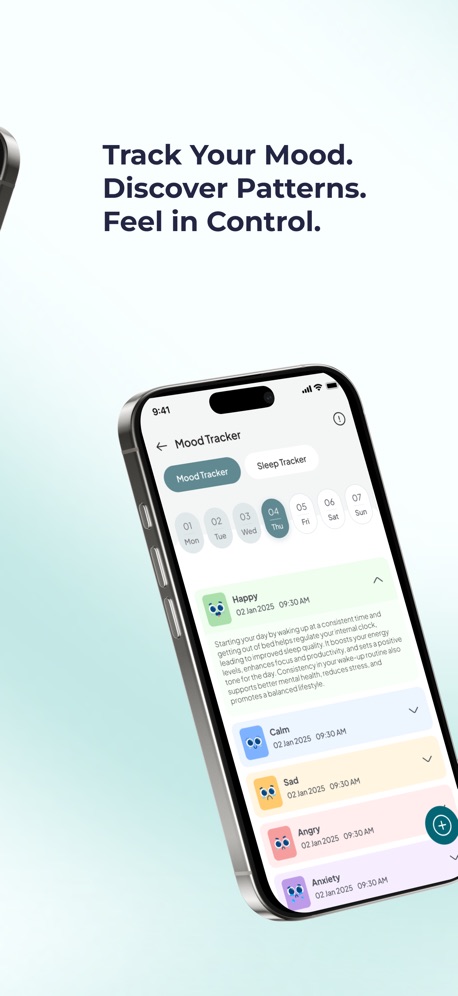
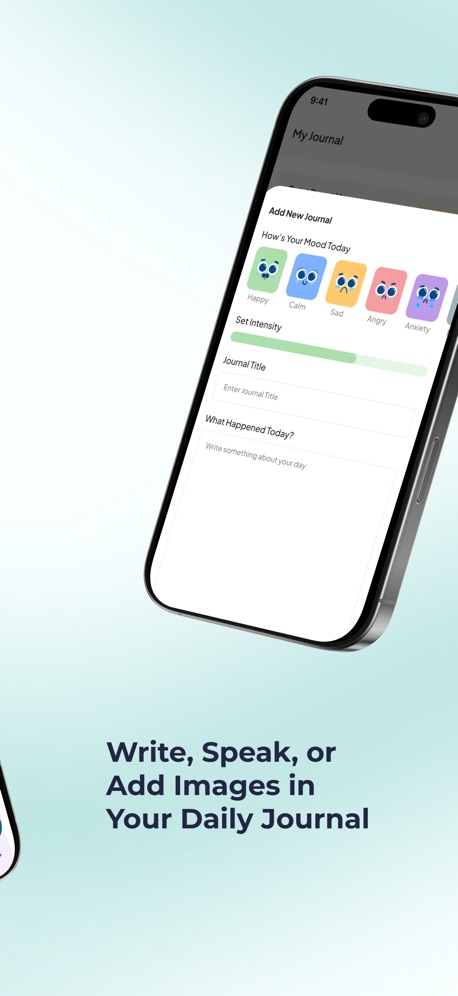
- Journal: write, speak or add images to dump racing thoughts before you start.
- Sound therapy and one subscription for 9 conditions, including ADHD and anxiety.
Pros
- Tackles the anxiety and overwhelm behind poor focus
- Built for ADHD brains
- Works alongside any focus timer
- Clear 7-day free trial, then $49.99/year
Cons
- No tree timer or app blocker, so keep Forest or Flora running for the focus session itself
Pricing
- Free to download with a 7-day free trial
- $49.99/year or $8.99/month (U.S.)
Suitable for
- People with ADHD who struggle to start tasks
- Anyone whose focus collapses under stress
- Students and workers who procrastinate from overwhelm
How to start
- Download Soothfy free on iPhone or Android.
- Take the 2-minute assessment.
- Next time you can't start, open Instant Relief, try one exercise, then plant your tree.
What users say
"This app is so helpful and I noticed great improvements after just a few days! All of the trackers and reminders help me so much!"
App Store review (U.S.)
Unblock your focus in 2 minutes
CBT relief for overwhelm, Anchor Habits and a daily plan. Free for 7 days.
Free to download · 7-day free trial


2. Flora: Best Free Tree-Growing Focus Timer
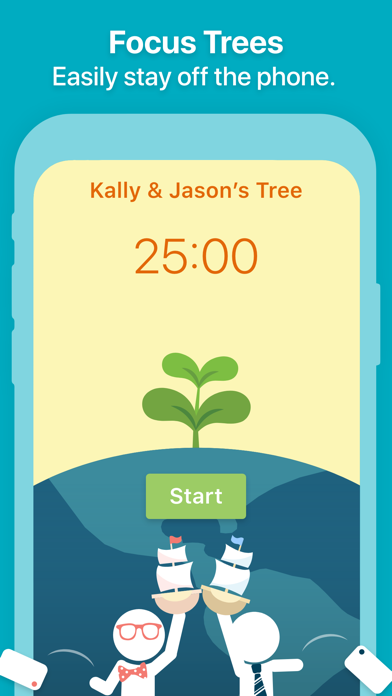
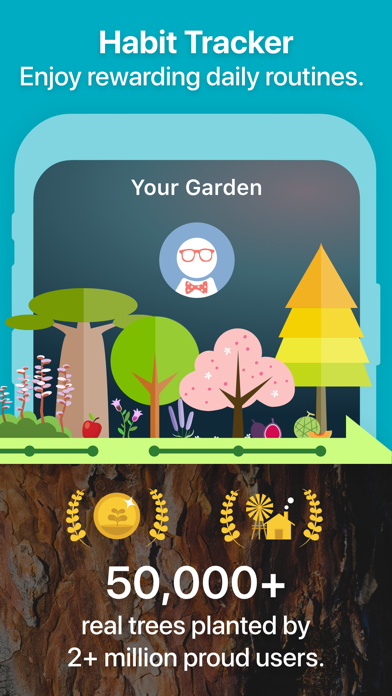
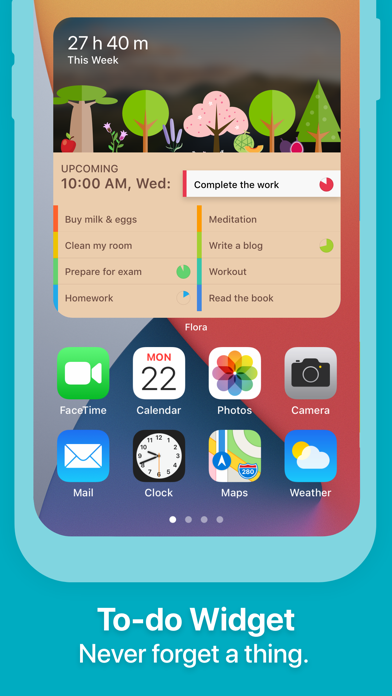
Flora works just like Forest: plant a seed when you want to focus, and it grows into a tree while you stay off your phone. Leave early and the tree dies. You can focus together with friends, set up habits and to-dos, and join optional real-tree planting campaigns. Users like how it tracks focus time and break time and grows plants from different places around the world.
Compared with Forest, Flora's core timer is free, with only small optional in-app purchases for extra content listed in the U.S. App Store (October 2026), while Forest has moved toward subscriptions. It's slightly less polished, and some users have reported occasional connection issues at the end of long sessions. If cost is the main reason you're leaving Forest, Flora is the easiest switch.
Our take: choose Flora if you love Forest's idea but don't want to pay. See our Flora alternatives guide.
Key features
- Tree-growing focus timer
- Focus with friends
- Habits and to-dos
- Focus and break tracking
- Real-tree campaigns
Pros
- Free core timer
- Same motivating concept as Forest
- Friends mode
Cons
- Slightly less polished
- Occasional connection issues
- Doesn't help with anxiety
Pricing
- Free
- Small optional in-app purchases (U.S. App Store)
Suitable for
- Forest users who want a free alternative
How to start
- Download Flora and plant one 25-minute tree for your next task.
What users say
"For the most part, this app has gotten me off my phone and focused on work."
App Store review (U.S.)
3. Focus To-Do: Best Pomodoro Timer With Tasks

Focus To-Do combines a Pomodoro timer with a task manager. You organize tasks into projects and lists, estimate how many Pomodoros each needs, start the timer right from the task and see charts of where your time goes. It syncs between phone and computer and includes reminders for tasks and errands.
Compared with Forest, Focus To-Do connects your focus sessions to real tasks, so you finish a session knowing exactly what you worked on and for how long. Reviewers with ADHD say seeing time per task helps with time blindness. It's cheap, with a lifetime upgrade listed at $11.99 in the U.S. App Store (October 2026). Some long-time users have reported bugs and sorting issues after updates.
Our take: choose Focus To-Do if you want your timer and to-do list in one place.
Key features
- Pomodoro timer
- Tasks, projects and lists
- Time-per-task reports
- Reminders
- Phone and computer sync

Pros
- Timer and tasks together
- Clear time tracking
- Cheap lifetime upgrade

Cons
- Less fun than Forest
- Some reported bugs
- No anxiety support
Pricing
- Free
- Lifetime $11.99; 3 months $3.99 (U.S. App Store)
Suitable for
- People who want to plan and track focused work
How to start
- Download Focus To-Do and estimate Pomodoros for today's top 3 tasks.
What users say
"I have hyperfocus ADD (hard to get started, but once I get started, I can't shift gears)"
App Store review (U.S.)
4. Structured: Best Visual Day Planner

Structured is a visual day planner that puts your tasks and calendar on one timeline, so you can see your whole day at a glance and block time for focused work. You can drag tasks around, move unfinished ones to an inbox, set reminders and sync with your calendar across iPhone, iPad, Mac and Android. It says it has 1.5 million active users.
Compared with Forest, Structured solves a different focus problem: knowing what to work on and when. Many people find a clear plan removes the overwhelm that makes them reach for their phone in the first place. Reviewers with ADHD say it's the first planner they kept using. Structured Pro is listed in the U.S. App Store from $2.99 a month and $9.99 to $34.99 a year, with a $99.99 lifetime option (October 2026).
Our take: choose Structured if your focus problem starts with not knowing what to do next.
Key features
- Visual daily timeline
- Time blocking
- Calendar sync
- Task inbox
- Apple and Android apps

Pros
- Clear, visual plan for the day
- Affordable, with lifetime option
- Works across devices

Cons
- No focus timer rewards
- No blocking
- Pro needed for some features
Pricing
- Free
- Structured Pro from $2.99/month or $9.99/year; $99.99 lifetime (U.S. App Store, several prices)
Suitable for
- People who need a clear plan before they can focus
How to start
- Download Structured and time-block tomorrow's first two focus sessions.
What users say
"I have ADHD, as many people who use this do."
App Store review (U.S.)
5. Session: Best Focus Timer for Desk Work
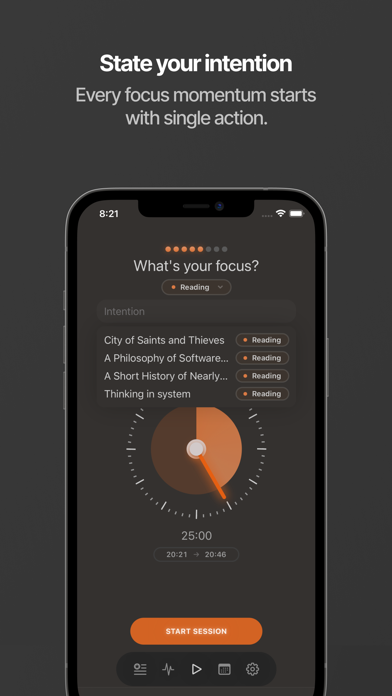
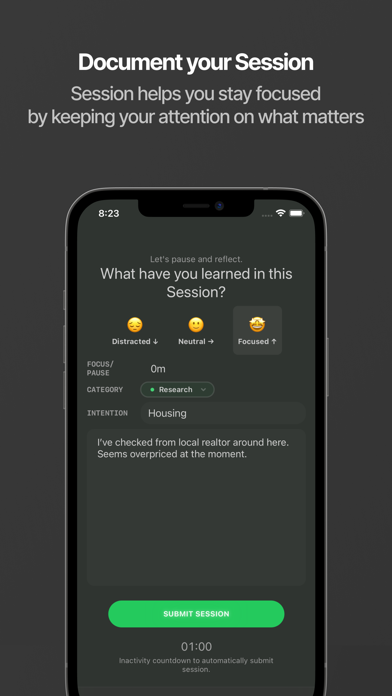
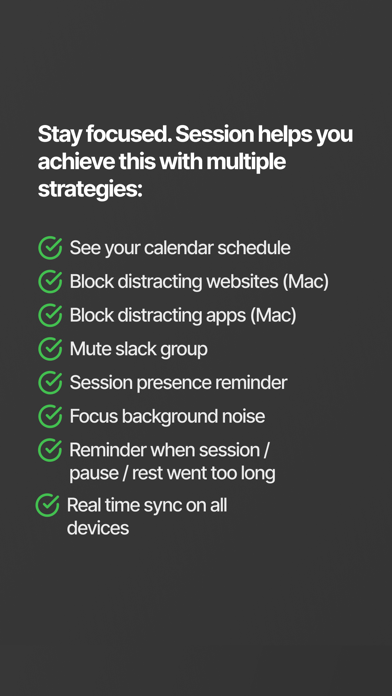
Session is a Pomodoro-inspired focus timer built for computer workers. You name what you're working on, start a session, block distracting apps and websites, and Session reminds you to take breaks so you don't burn out. It tracks time by category and offers shortcuts and integrations.
Compared with Forest, Session covers your computer as well as your phone, which matters if most of your distractions are on your laptop. Reviewers say it replaced more expensive tools and praise its sleek design. It's less playful, with no trees to grow. Its subscription is listed at $4.99 a month or $39.99 a year in the U.S. App Store (October 2026), and its last update was in July 2026.
Our take: choose Session if you do deep work at a desk and need focus on your Mac too.
Key features
- Named focus sessions
- App and website blocking
- Break reminders
- Time tracking by category
- Shortcuts and integrations
Pros
- Works on Mac and iPhone
- Sleek design
- Helps prevent burnout
Cons
- Subscription for full features
- Less playful than Forest
- No mental health tools
Pricing
- Free
- $4.99/month or $39.99/year (U.S. App Store)
Suitable for
- Writers, developers and desk workers
How to start
- Download Session on Mac and iPhone and run one named 25-minute session.
What users say
"The UI is sleek and very easy to use."
App Store review (U.S.)
6. Tide: Best Focus Sounds and Timer

Tide pairs immersive nature sounds, like rain, ocean waves, forests and fires, with a calm, minimalist focus timer. You can mix sounds, play them alongside music and listen offline. It also includes meditation and sleep tracking, so many people use it all day: focus during work, wind down at night.
Compared with Forest, Tide replaces the tree reward with sound, which suits people who find silence or noisy rooms make focus harder. A steady soundscape can make sessions easier to start and keep going. It's weaker at keeping you off your phone, and some free features have moved behind Tide Plus over time. Tide Plus is listed in the U.S. App Store at $54.99 to $59.99 a year or $9.99 to $11.99 a month (October 2026).
Our take: choose Tide if background sound is what helps you focus.
Key features
- Nature sound mixes
- Focus timer
- Meditation
- Sleep tracking
- Offline listening

Pros
- Beautiful sounds
- Focus and sleep in one app
- No ads

Cons
- Weaker phone blocking
- Some features moved to Plus
- Several prices
Pricing
- Free
- Tide Plus $54.99–59.99/year or $9.99–11.99/month (U.S. App Store, several prices)
Suitable for
- People who focus better with background sound
How to start
- Download Tide, choose rain sounds and run one 25-minute focus timer.
What users say
"Tide is one of a kind and the king of all of 'em."
App Store review (U.S.)
7. Opal: Best Strict App Blocker

Opal is a screen time app that blocks distracting apps on a schedule, during focus sessions or after daily limits. It shows real-time phone usage, adds leaderboards and rewards, and lets you make some blocks hard to undo. Opal says that as of August 2026 its members have saved 500 million hours of screen time.
Compared with Forest, Opal is much stricter. Forest depends on you caring about a virtual tree; Opal actually locks the apps. If you've learned to ignore your dying trees, that firmness can make a big difference, and students often say it rescued their grades. Its premium plans are listed in the U.S. App Store at up to $19.99 a month or $99.99 a year, with weekly and student plans (October 2026), though the free version includes basic blocking.
Our take: choose Opal if gentle nudges no longer work and you need hard limits.
Key features
- Scheduled app blocking
- Locked focus sessions
- Daily app limits
- Real-time screen time data
- Leaderboards and rewards

Pros
- Firm, effective blocking
- Detailed insights
- Useful free version

Cons
- Expensive premium
- Can feel strict
- Doesn't address why you're distracted
Pricing
- Free with basic blocking
- Plans up to $19.99/month or $99.99/year; weekly and student plans listed (U.S. App Store)
Suitable for
- People who need hard limits on social media
How to start
- Download Opal and block your top two distracting apps during work hours.
What users say
"even without memberships there are so many options opal gives you in order to limit your apps"
App Store review (U.S.)
Final Thoughts
Forest is a great way to put your phone down, but if your focus still falls apart, the phone may not be the real problem. Soothfy is our top pick when anxiety, stress or ADHD overwhelm blocks your focus: 2-minute CBT relief, Anchor Habits and a daily plan that adapts to your energy, used alongside any timer. For a free tree timer, choose Flora. For tasks and time tracking, Focus To-Do. For a visual plan, Structured. For desk work, Session. For focus sounds, Tide, and for strict blocking, Opal.
More guides: Flora Alternatives, Best Apps for Test Anxiety, Best ADHD Apps for Women, Productive Alternatives, Habit Tracker Alternatives, ADHD Morning Routine, Best Apps for Overthinking and 8 Signs You Have ADHD and Anxiety.
Try Soothfy free for 7 days
The Forest companion that helps when anxiety or ADHD blocks your focus.
Free to download · 7-day free trial
Best Forest Alternatives: FAQs (2026)
1. What is the Forest app?
Forest is a focus timer where you plant a virtual tree that grows while you stay off your phone and withers if you leave early. You can focus with friends, collect tree species and help plant real trees through its partnership with Trees for the Future. It's available on iPhone, Android and as a browser extension, and it's especially popular with students.
2. How much does Forest cost?
Forest's plans are listed in the U.S. App Store from $5.99 a month or $35.99 a year (early bird pricing), plus optional in-app purchases (October 2026). Check the current price on your device, as offers change.
3. What is the best alternative to Forest?
It depends on why you're switching. If anxiety, stress or ADHD overwhelm blocks your focus, Soothfy is the best choice, with 2-minute CBT relief, Anchor Habits and a daily plan. For the same tree concept for free, Flora is the closest match.
4. Is there a free alternative to Forest?
Yes. Flora's core tree timer is free. Focus To-Do, Structured, Session, Tide and Opal also have free versions with limits. Try a free option for two weeks before paying, so you know which style of focus tool actually works for you.
5. Is Flora or Forest better?
Forest is more polished and has a larger community. Flora is free and works the same way. If cost matters most, Flora is the better deal; if you want the most refined experience, Forest is worth it.
6. What is the best focus app for ADHD?
Many people with ADHD combine a visual timer, like Forest, Flora or Tiimo, with tools that make starting easier. Soothfy is built for ADHD brains, helping with the overwhelm and anxiety that make tasks hard to start, and Structured or Focus To-Do help with planning and time blindness.
7. Why can't I focus even with Forest?
Forest removes phone distractions, but it doesn't fix anxiety about the task, ADHD-related trouble starting, poor sleep or not knowing what to do first. Try planning your first step, calming your body for 2 minutes, and checking your sleep.
8. What is the Pomodoro technique?
The Pomodoro technique means working in focused blocks, usually 25 minutes, followed by a 5-minute break, with a longer break after four blocks. Forest, Flora, Focus To-Do and Session all support it. Shorter blocks, like 10 or 15 minutes, can work better for ADHD.
9. Do app blockers work better than Forest?
For some people, yes. App blockers like Opal lock apps so you can't open them, while Forest relies on motivation. If you regularly let your trees die, a firmer blocker may help. Some people use both: a blocker for social media and a timer for the focus session itself.
10. Can background sounds help me focus?
Many people focus better with steady background sound, like rain or white noise, which masks distracting noises. Tide and Soothfy's sound therapy are good options to try. Experiment with different sounds and volumes for a few days to find what suits your brain.
11. How does sleep affect focus?
Poor sleep makes attention, memory and emotional control much harder the next day. Soothfy tracks mood and sleep together so you can see how your nights affect your focus. A consistent wake time is one of the simplest ways to improve next-day focus.
12. How do I stop procrastinating?
Make the first step tiny, like opening the file, set a short timer and remove distractions. Notice the feeling behind procrastination, often anxiety or boredom, and address it directly. Soothfy's Instant Relief has exercises for procrastination anxiety and overwhelm.
13. Can I use Soothfy with Forest?
Yes. Use Soothfy to calm anxiety or overwhelm and plan your day, then plant a Forest tree for the focus session itself. Many people find the combination works better than either alone.
14. What if anxiety stops me from focusing?
Anxiety pulls your attention toward worries, which makes focus much harder. Try 2 minutes of slow breathing or grounding before you start, and write down worries to deal with later. If anxiety affects your work or studies most days, talk to a doctor or therapist.
Ready to focus without the overwhelm?
Download Soothfy free and try Instant Relief before your next focus session.
Free to download · 7-day free trial
This article is for information only and is not medical advice. Prices and features change often. Last updated October 30, 2026.