Best ADHD Apps for Students: 7 Apps for Studying, Focus and Stress in 2026
By Soothfy Team ·
Studying with ADHD is hard. Here are the best ADHD apps for students in 2026, from homework planners and focus timers to exam stress tools.
The assignment was set three weeks ago. You meant to start it every day. Now it's due tomorrow, it's 11 p.m., and your brain has finally switched on, along with a wave of panic. Sound familiar?
Students with ADHD aren't lazy or less capable. ADHD affects executive function, the brain skills behind planning, starting tasks, estimating time and managing emotions, and school demands all of them at once. The right tools can take some of that load off your brain: a planner that remembers deadlines for you, a timer that makes starting easier, sound that helps you focus and support for the stress that builds when you fall behind.
In this guide we compare the 7 best ADHD apps for students in 2026: what each one helps with, what it costs and which students it suits best.
Quick guide: the best ADHD apps for students in 2026
- 🥇 Soothfy: best overall, with help for overwhelm and exam stress, Anchor Habits, a daily plan and sleep tracking
- My Study Life: best school planner for classes, homework and exams
- Tiimo: best visual planner for time blindness
- Forest: best focus timer for phone-free studying
- Focus To-Do: best Pomodoro timer with tasks
- Structured: best visual timeline for your day
- Brain.fm: best focus music with an ADHD mode
How We Chose These ADHD Apps for Students
To build this list, we compared each app's U.S. App Store listing, features and current prices, and read App Store reviews from students, many of whom mention ADHD. We looked for tools that cover the whole school week: remembering deadlines, planning study time, starting and staying focused, and handling the stress when things pile up.
Soothfy is our app. Where another app is the better pick for a need, we say so. Apps support ADHD but don't replace diagnosis, treatment or school accommodations.
- Help with core study struggles: planning, starting, focus and time
- Support for stress and overwhelm, which often comes with ADHD at school
- Student-friendly pricing: real U.S. App Store prices, October 2026, with free options
- Real user reviews, many from students with ADHD
- Actively updated in 2026
What Are the Best ADHD Apps for Students?
The best ADHD apps for students act like an external brain. A planner holds every class, assignment and exam so your memory doesn't have to. A visual timer or focus app makes time feel real and starting easier. Focus sound blocks distractions. And a mental health tool helps with the overwhelm, procrastination anxiety and exam stress that so often come with ADHD. Most students do best with two or three apps that work together, rather than one that tries to do everything. Here's how they compare at a glance.
Best ADHD Apps for Students Compared
| App | Best for | Price (U.S.) |
|---|---|---|
| 🥇 Soothfy | Overwhelm + exam stress + habits + sleep tracking | Free download · 7-day trial · $49.99/yr |
| My Study Life | Classes, homework and exams | Free · MyStudyLife+ $39.99/yr |
| Tiimo | Visual planning, time blindness | Free · Pro from $36/yr |
| Forest | Phone-free study | Plans from $5.99/mo |
| Focus To-Do | Pomodoro + tasks | Free · $11.99 lifetime |
| Structured | Visual day timeline | Free · Pro from $9.99/yr |
| Brain.fm | Focus music, ADHD mode | Free trial · from $6.99/mo |
Prices: U.S. App Store listings, October 2026. They vary by country, plan and offer.
The 7 Best ADHD Apps for Students in 2026
1. Soothfy: Best Overall ADHD App for Students


Soothfy is a mental health app built for ADHD brains, covering ADHD, anxiety, stress, depression and insomnia in one subscription. For students, it handles the part planners can't: the overwhelm, procrastination anxiety and exam panic that stop you from starting. Open Instant Relief, tap your exact symptom, like overwhelm, racing thoughts or dread about a deadline, and get 3 CBT exercises with a 2-minute timer. Anchor Habits tie study routines to things you already do, a personalized 30-day plan adapts on low-energy days, and mood and sleep tracking shows how late nights affect your grades.
Key features
- Instant Relief: 35 symptoms, including overwhelm and procrastination anxiety, each with 3 CBT exercises and a 2-minute timer.
- Anchor Habits: study habits tied to your routine, like reviewing notes right after dinner.
- Personalized 30-day plan: small daily steps that adapt to your mood and energy, so a rough week doesn't derail everything.

- Mood and sleep tracker: see how sleep and stress affect your focus, with reports you can share with your doctor.
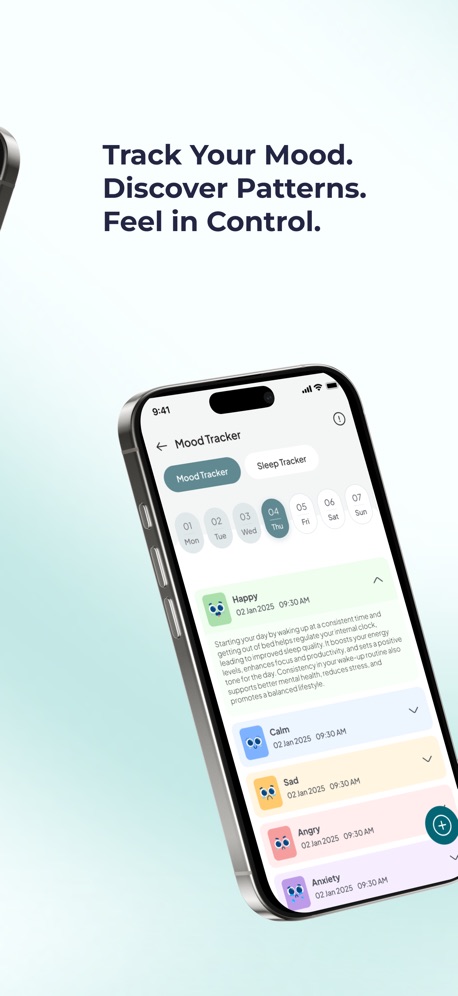
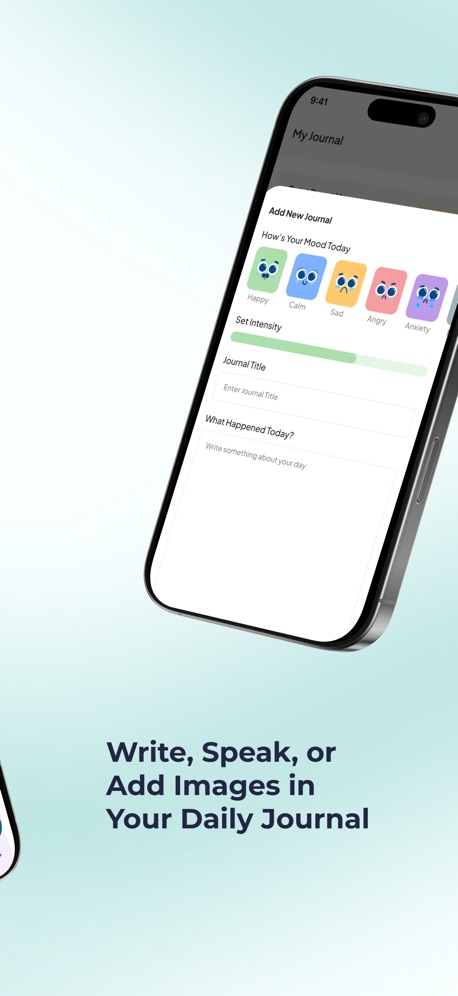
- Journal: write or record a voice note to dump worries before you study or sleep.
- One subscription for 9 conditions, plus sound therapy, a CBT library and a moderated community.
Pros
- Helps with the stress and overwhelm behind procrastination
- Built for ADHD brains
- Short 2-minute tools fit between classes
- Clear 7-day free trial, then $49.99/year
Cons
- No homework planner or class timetable, so pair it with My Study Life or Tiimo for deadlines
Pricing
- Free to download with a 7-day free trial
- $49.99/year or $8.99/month (U.S.)
Suitable for
- Students with ADHD who freeze before big assignments
- Anyone with exam stress or procrastination anxiety
- Students whose sleep falls apart during busy weeks
How to start
- Download Soothfy free on iPhone or Android.
- Take the 2-minute assessment.
- Next time an assignment feels overwhelming, open Instant Relief, try one exercise, then start for just 5 minutes.
What users say
"This app is so helpful and I noticed great improvements after just a few days! All of the trackers and reminders help me so much!"
App Store review (U.S.)
Study without the overwhelm
CBT relief for stress, Anchor Habits and sleep tracking. Free for 7 days.
Free to download · 7-day free trial


2. My Study Life: Best School Planner for Classes, Homework and Exams

My Study Life is a student planner trusted by more than 10 million students in 187 countries. You build your class schedule, track homework and assignments, record grades and plan for exams, with reminders so nothing slips through the cracks. Its AI assistant, Scout, helps you plan your study time and stay on top of deadlines, and it syncs across your devices.
Compared with general to-do apps, My Study Life is built around how school actually works, with rotating timetables, terms and subjects. For students with ADHD who forget assignments, that structure can be a lifesaver, and reviewers say it worked when paper planners never did. Some long-time users disliked a recent redesign. MyStudyLife+ is listed at $39.99 a year or $6.99 a month in the U.S. App Store, with family plans (October 2026).
Our take: choose My Study Life if your biggest problem is keeping track of classes, assignments and exam dates.
Key features
- Class timetable with rotations
- Homework and assignment tracking
- Exam planning and reminders
- Grade tracking
- AI planning assistant
- Cross-device sync

Pros
- Built for school schedules
- Reminders for every deadline
- Generous free version

Cons
- Some users dislike the recent redesign
- Plus needed for AI features
- No focus or stress tools
Pricing
- Free
- MyStudyLife+ $39.99/year or $6.99/month; family plans listed (U.S. App Store)
Suitable for
- Students who forget assignments and exam dates
How to start
- Download My Study Life and enter your class schedule and every deadline for this month.
What users say
"I've tried for years to use a physical planner but it's never worked out and I'd always abandon them after a day or two."
App Store review (U.S.)
3. Tiimo: Best Visual Planner for Time Blindness

Tiimo is a visual planner built for neurodivergent minds and was Apple's iPhone App of the Year in 2025. It shows your day as a colorful visual timeline with icons and countdown timers, and its AI planning helps break big tasks, like an essay, into small steps with time estimates.
Compared with a school planner, Tiimo focuses on the day itself: how long until class, how much time is left for homework, when to stop and switch. That makes it especially useful for students with time blindness, who often lose hours without noticing. Some users find its notifications take a bit of setup. Tiimo Pro is listed at several prices in the U.S. App Store, from about $7 to $14 a month or $36 to $54 a year (October 2026).
Our take: choose Tiimo if losing track of time is what makes your study days fall apart.
Key features
- Visual daily timeline
- Countdown timers
- AI task breakdown
- Routines and reminders
- Widgets and Apple Watch

Pros
- Makes time visible
- Breaks big tasks into steps
- Designed for ADHD and autism

Cons
- Pro needed for many features
- Notifications need tweaking
- Not a homework tracker
Pricing
- Free with limits
- Tiimo Pro from about $7/month or $36/year (U.S. App Store, several prices)
Suitable for
- Students with time blindness
How to start
- Download Tiimo and ask it to break your next big assignment into steps.
What users say
"I absolutely love this app, it is pretty much exactly what I'm looking for."
App Store review (U.S.)
4. Forest: Best Focus Timer for Phone-Free Studying

Forest is a focus timer used by millions of students. You plant a virtual tree, put your phone down and study while it grows. Leave early and the tree withers. You can study with friends, see your focus history as a forest and unlock new species, and the community has planted more than 2 million real trees.
Compared with planners, Forest tackles the moment of studying itself. For students with ADHD, the simple, visible consequence of a dying tree adds just enough structure to stay off the phone, and reviewers say they've used it from high school through law school. It doesn't help with planning or stress. Plans are listed in the U.S. App Store from $5.99 a month or $35.99 a year (early bird), plus in-app purchases (October 2026). See our Forest alternatives guide.
Our take: choose Forest if your phone is the main thing pulling you away from studying.
Key features
- Tree-growing focus timer
- Study with friends
- Focus history
- Real-tree planting
- Unlockable species

Pros
- Simple and motivating
- Great for group study
- Huge student community

Cons
- No planning or stress tools
- Subscription and in-app purchases
- Phone-focused only
Pricing
- Plans from $5.99/month or $35.99/year (early bird), plus in-app purchases (U.S. App Store)
Suitable for
- Students distracted by their phone
How to start
- Download Forest and plant three 25-minute trees in your next study session.
What users say
"I am someone who struggles tremendously with studying due to my ADHD."
App Store review (U.S.)
5. Focus To-Do: Best Pomodoro Timer With Tasks

Focus To-Do combines a Pomodoro timer with a task manager. You list your study tasks, estimate how many Pomodoros each one needs, start the timer from the task and see charts of where your time went. It syncs between phone and computer, so you can plan on your laptop and focus with your phone.
Compared with Forest, Focus To-Do links each focus session to a specific task, which helps students with ADHD see real progress and estimate time more accurately next time. Reviewers with ADHD say seeing time per task finally helped with time blindness. It's cheap, with a lifetime upgrade listed at $11.99 in the U.S. App Store (October 2026). Some long-time users have reported bugs after updates.
Our take: choose Focus To-Do if you want your study tasks and timer in one place.
Key features
- Pomodoro timer
- Task lists and projects
- Time-per-task reports
- Reminders
- Phone and computer sync

Pros
- Timer and tasks together
- Helps with time estimates
- Cheap lifetime upgrade

Cons
- Some reported bugs
- Less fun than Forest
- No stress tools
Pricing
- Free
- Lifetime $11.99; 3 months $3.99 (U.S. App Store)
Suitable for
- Students who want to plan and time study tasks
How to start
- Download Focus To-Do and estimate Pomodoros for tonight's homework.
What users say
"it has been so helpful and motivational to see where I'm spending my time."
App Store review (U.S.)
6. Structured: Best Visual Timeline for Your Day

Structured is a visual day planner that maps your classes, tasks and calendar onto one timeline. You can time-block study sessions, drag tasks around when plans change, move unfinished tasks to an inbox and sync with your school calendar, across iPhone, iPad, Mac and Android.
Compared with Tiimo, Structured is simpler and more like a calendar, which suits students who already use a calendar for classes and want study blocks alongside them. Reviewers with ADHD who started new jobs or college say it was the first planner they didn't abandon. Structured Pro is affordable, listed in the U.S. App Store from $2.99 a month and $9.99 to $34.99 a year, with a $99.99 lifetime option (October 2026).
Our take: choose Structured if you want a clean, visual view of classes and study time together.
Key features
- Visual daily timeline
- Time blocking
- Calendar sync
- Task inbox
- Apple and Android apps

Pros
- Simple and clear
- Affordable for students
- Works across devices

Cons
- Less ADHD-specific than Tiimo
- No stress tools
- Pro for some features
Pricing
- Free
- Structured Pro from $2.99/month or $9.99/year; $99.99 lifetime (U.S. App Store, several prices)
Suitable for
- Students who want classes and study blocks on one timeline
How to start
- Download Structured, sync your calendar and time-block two study sessions for tomorrow.
What users say
"I have ADHD and have probably spend hundreds of $ on planners just to use them for a few weeks and then forget they exist."
App Store review (U.S.)
7. Brain.fm: Best Focus Music With an ADHD Mode

Brain.fm creates music designed to help you focus, relax and sleep, and it now includes an ADHD mode. Instead of a regular playlist, its tracks are built to support sustained attention without catchy lyrics or sudden changes that pull you away. You choose an activity, like deep work or studying, and a session length.
Compared with timers and planners, Brain.fm helps students who find silence distracting or noisy dorms impossible. Reviewers with ADHD describe it as giving their brain structure without feeling rigid, and many say they can't study without it now. It's mostly about focus, with no planning or stress tools. Brain.fm Pro is listed in the U.S. App Store from $6.99 to $14.99 a month and $49.99 to $99.99 a year (October 2026), and it isn't free beyond a trial.
Our take: choose Brain.fm if background sound is what gets your ADHD brain into focus.
Key features
- Focus music with ADHD mode
- Relax, meditate and sleep sessions
- Session timers
- Activity-based tracks
- Offline listening

Pros
- Designed for sustained focus
- ADHD mode
- Works with any study method

Cons
- Paid after the trial
- Several prices listed
- No planning tools
Pricing
- Free trial
- Brain.fm Pro from $6.99 to $14.99/month or $49.99 to $99.99/year (U.S. App Store, several prices listed)
Suitable for
- Students who focus better with background sound
How to start
- Download Brain.fm, choose ADHD mode and play it during your next 25-minute study block.
What users say
"External structure and tools to help me maintain focus are important for me and many others with ADHD."
App Store review (U.S.)
Final Thoughts
ADHD makes school harder, but the right combination of apps can take a lot of the load off your brain. Soothfy is our top pick because it tackles what planners can't: the overwhelm, procrastination anxiety and exam stress that stop you from starting, plus Anchor Habits and sleep tracking. Pair it with My Study Life or Tiimo for deadlines and time, and Forest, Focus To-Do or Brain.fm for focus. Structured is a great alternative if you prefer a simple timeline.
If you have ADHD, ask your school about accommodations like extra time on exams, a quieter testing room or extended deadlines. They're designed to level the playing field, not give an advantage.
More guides: Best Apps for Test Anxiety, Best ADHD Apps for Women, Forest Alternatives, Flora Alternatives, ADHD Morning Routine, ADHD Sleep Problems, Best Apps for Overthinking and 8 Signs You Have ADHD and Anxiety.
Try Soothfy free for 7 days
ADHD support for overwhelm, exam stress and study routines.
Free to download · 7-day free trial
Best ADHD Apps for Students: FAQs (2026)
1. What is the best ADHD app for students?
Soothfy is our top pick, because it helps with the overwhelm, procrastination anxiety and exam stress that often come with ADHD, using 2-minute CBT exercises, Anchor Habits, a daily plan and sleep tracking. My Study Life is the best school planner, and Tiimo is the best for time blindness.
2. How do students with ADHD study best?
Short focused blocks, like 15 to 25 minutes, with breaks work well. Break big tasks into tiny first steps, remove phone distractions, use background sound if it helps, and study at the time of day your focus is strongest. Active methods, like practice questions, usually beat rereading notes.
3. Why do I procrastinate so much with ADHD?
ADHD affects executive function, which makes starting tasks, especially boring or overwhelming ones, much harder. Procrastination is often driven by anxiety, perfectionism or not knowing where to start. Breaking the task down and calming the anxiety first usually helps more than willpower.
4. What is time blindness?
Time blindness describes difficulty sensing how much time has passed or estimating how long tasks take, which is common with ADHD. It leads to running late and leaving assignments to the last minute. Visual timers like Tiimo and Focus To-Do help make time visible.
5. Are there free ADHD apps for students?
Yes. My Study Life, Tiimo, Focus To-Do and Structured all have free versions. Soothfy has a 7-day free trial, and Brain.fm offers a free trial. Many students combine one free planner with one focus tool.
6. Is the Pomodoro technique good for ADHD?
Many students with ADHD find Pomodoro helpful, because short blocks feel more manageable and breaks prevent burnout. If 25 minutes feels too long, start with 10 or 15. Focus To-Do, Forest and other timers make it easy to try.
7. Can music help with ADHD focus?
Some people with ADHD focus better with steady background sound, while others prefer silence. Music without lyrics, white noise or focus music like Brain.fm's ADHD mode is worth testing for a week to see what works for you.
8. How can I manage exam stress with ADHD?
Start revision early in short sessions, practise under timed conditions, sleep well before the exam and use a 2-minute breathing or grounding exercise on the day. Soothfy's Instant Relief is built for quick calm. Ask your school about accommodations like extra time.
9. What accommodations can students with ADHD get?
Depending on your school and diagnosis, common accommodations include extra time on tests, a quiet testing room, breaks during exams, extended deadlines and note-taking support. Contact your school's disability or student support office to ask.
10. Can ADHD affect sleep and grades?
Yes. Many students with ADHD struggle to wind down at night, and poor sleep makes focus, memory and mood worse the next day. Soothfy tracks mood and sleep together so you can see the link.
11. Should I use a paper planner or an app?
Many students with ADHD abandon paper planners because they forget to check them. Apps with reminders and widgets, like My Study Life or Structured, are harder to forget. Use whichever you'll actually look at every day. Some students use both: an app for reminders and paper for big-picture planning.
12. How many apps should I use?
Two or three that work together is usually enough: a planner for deadlines, a focus tool for studying and a support app for stress. Too many apps can become another source of overwhelm. Give each new app at least two weeks before deciding whether it works for you.
13. Do ADHD apps replace medication or therapy?
No. Apps can help with planning, focus and stress, but they don't replace diagnosis, medication or therapy when needed. Many students use apps alongside treatment to make daily life easier.
14. What should I do if I'm falling behind at school?
Tell a teacher, counselor or academic advisor early, rather than waiting. Make a short list of what's due, pick the most urgent task and do the first small step today. If stress or low mood is building, talk to someone you trust or a doctor. In a crisis in the U.S., call or text 988.
Ready to study with less stress?
Download Soothfy free and try Instant Relief before your next study session.
Free to download · 7-day free trial
This article is for information only and is not medical advice. Prices and features change often. Last updated October 31, 2026.