Best ScreenZen Alternatives in 2026: 7 Screen Time Apps Compared
By Soothfy Team ·
Looking for a ScreenZen alternative? We compare the 7 best screen time and app blocker apps in 2026, from gentle pauses to physical blockers, with real prices.
ScreenZen is a rare thing: a free, ad-free app that genuinely helps people use their phones less. When you open a distracting app, it pauses and asks "Is this important?" It has 4.9 stars from about 54,000 U.S. App Store reviews, and the company says over 500,000 people use it each month (Habit Doom).
So why look elsewhere? Usually because the pause can be dismissed, and on tired or stressful days, many people tap straight through it. Others want stricter blocking, laptop blocking, or help with the reasons they reach for their phone. This guide compares the 7 best ScreenZen alternatives in 2026.
Quick answer: the best ScreenZen alternatives in 2026
🥇 Soothfy: best for the reason you pick up your phone, with 2-minute CBT relief
one sec: closest alternative, with a breathing pause
Opal: best for strict schedules and Hard Mode
Brick: hardest to bypass
Freedom: best for phone and computer together
ClearSpace: best for mindful screen time goals
Apple Screen Time: best built-in option
About Soothfy (who wrote this)
This guide is written by the team behind Soothfy, a mental health app for ADHD, anxiety, depression, stress, insomnia, OCD, PTSD, panic attacks and addictive habits. Soothfy is our product, so we say clearly where another app is the better pick. Download Soothfy on the App Store or Google Play.
ScreenZen Alternatives Compared
App
Mechanism
U.S. rating
Price (U.S.)
🥇 Soothfy
Calms the urge
—
$49.99/yr (free trial)
one sec
Breathing pause
4.8 (≈24K)
9.99/yr · $99.99 lifetime
Opal
Schedules + Hard Mode
4.7 (≈92K)
$99.99/yr
Brick
Physical device
4.9 (≈61K)
~$59 one-time
Freedom
Cross-device blocking
4.5 (≈6K)
$39.99/yr
ClearSpace
Mindful pause + goals
4.7 (≈9K)
Free · Premium
Apple Screen Time
Limits
Built in
Free
ScreenZen (for reference)
Pause + prompt
4.9 (≈54K)
Free (tips) · Halo $49
Ratings from the U.S. App Store (Nov 2026); prices from Habit Doom comparisons, published by a competing app. Check the App Store before buying.
What ScreenZen Does Well
Completely free, with no subscription or premium tier
Customizable pauses, from a short delay to an intention prompt
Daily limits, cooldowns and schedules
Optional Strict Block when you need it
No account needed for the core app
Why People Look for a ScreenZen Alternative
The pause is easy to dismiss. Friction works until you're tired or stressed.
No computer blocking. Your laptop is still a distraction.
Wanting stricter rules. Some people need a hard lock.
The urge comes back. Block one app and the habit moves to another.
Scrolling is coping. If you scroll to escape anxiety or tasks, blocking alone won't change that.
How We Chose
Each option reduces phone distraction with a different mechanism
Free and one-time options included
Ratings checked on the U.S. App Store today
Soothfy is our app and doesn't block anything. If you just want a different blocker, one sec is the closest match.
The 7 Best ScreenZen Alternatives in 2026
1. Soothfy: Best for the Reason You Pick Up Your Phone
ScreenZen asks "Is this important?" before an app opens, and that pause helps. But if the honest answer is "No, I just can't face my inbox" or "I feel anxious and need a distraction", a pause only goes so far. You'll often tap through anyway. Soothfy works on what you're avoiding.
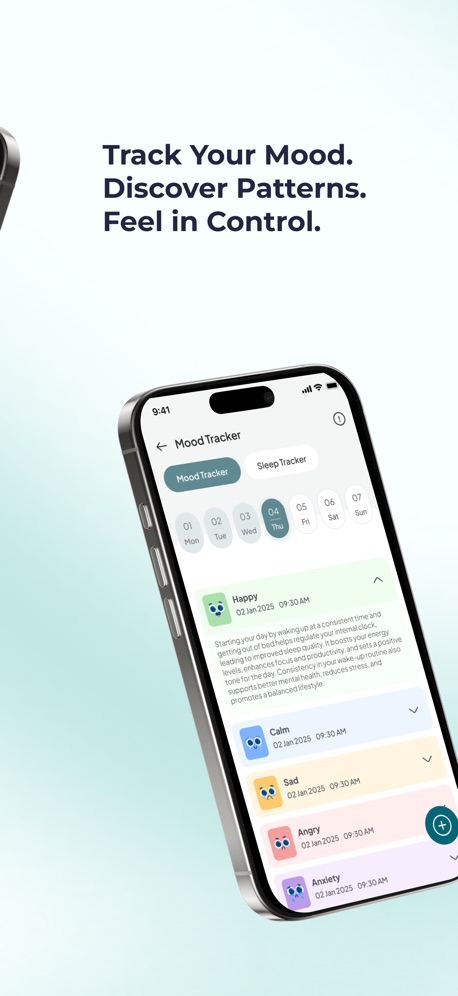
Instant Relief turns the pause into something useful: tap how you feel, like overwhelmed, anxious, bored or restless, and get 3 CBT exercises with a 2-minute timer. A personalized 30-day plan of 2- to 5-minute activities, tied to Anchor Habits, gives you a better default at the times you usually scroll, and the mood and sleep tracker shows how phone habits and sleep affect your days.
Compared with ScreenZen: ScreenZen is a free, excellent blocker; Soothfy isn't a blocker at all. They work well together: ScreenZen adds the pause, Soothfy gives you something better to do with it.
Key features
Instant Relief: pick your exact symptom, like overwhelm or a racing mind, and get 3 CBT exercises with a 2-minute timer
Personalized 30-day plan of 2- to 5-minute activities that adapts to your mood and energy
Anchor Habits: new habits tied to routines you already do, like making coffee
Mood and sleep tracker with weekly and monthly trends and reports for your doctor or therapist
Journal with text, voice notes and images
Pros
Turns the urge into a 2-minute reset
Helps with stress, anxiety and ADHD overwhelm
Pairs perfectly with ScreenZen
Cons
Doesn't block apps
Pricing
Free to download with a free trial, then $49.99/year or $8.99/month (U.S.). Get it on the App Store or Google Play, or learn more at soothfy.com.
Best for
People who tap through ScreenZen's pause
ADHD brains that scroll to escape tasks
Start with a 2-minute check-inA plan that adapts to you
Make the pause count
Try Soothfy free alongside ScreenZen: 2-minute CBT relief when you reach for your phone.
one sec asks you to take a slow breath before an app opens, then shows how many times you've tried to open it. Like ScreenZen, it adds friction instead of hard blocking. It has 4.8 stars from about 24,000 U.S. App Store reviews and works on iPhone, Android and Mac.
Compared with ScreenZen: A breathing pause instead of a prompt, with Mac support, but the free version covers only one app.
Key features
Breathing pause
Open-attempt counter
Mac and Android support
Pros
Calming, not punishing
Works on Mac
Cons
Free plan limited to one app
Pricing
Free for one app; Pro $6.99/month, 9.99/year or $99.99 lifetime (Habit Doom).
Best for
People who like a calming pause
3. Opal: Best for Strict Schedules
Opal lets you set blocking schedules, time limits and open limits, with a Hard Mode that can't be turned off until the session ends. It has 4.7 stars from about 92,000 U.S. reviews. See our Opal alternatives.
Compared with ScreenZen: Stricter, with polished reports, but expensive compared with free ScreenZen.
Key features
Schedules and limits
Hard Mode (Pro)
Focus Score and reports
Pros
Strong when you need strict blocks
Cons
Pro is expensive
Pricing
Free plan with one rule; 9.99/month, $99.99/year or $399 lifetime (Habit Doom).
Best for
People who need blocks they can't dismiss
4. Brick: Hardest to Bypass
Brick is a small physical device: tap your phone on it to block apps, and tap again to unblock. Because the device stays at home or work, you can't simply tap through a pause. It has 4.9 stars from about 61,000 U.S. reviews.
Compared with ScreenZen: Much harder to bypass, with a one-time hardware cost instead of tips.
Key features
Physical tap to block
Custom app lists
No subscription
Pros
Very hard to cheat
Cons
Hardware to carry or leave at home
Pricing
About $59 one-time for the device; free app (Habit Doom).
Best for
People who always dismiss software pauses
5. Freedom: Best for Phone and Computer
Freedom blocks apps and websites across Mac, Windows, iPhone and Android at the same time, with scheduled sessions. It has 4.5 stars from about 6,000 U.S. reviews.
Compared with ScreenZen: Covers your laptop too, but costs money and has no ongoing free tier.
ClearSpace adds a short pause and mindful prompt before distracting apps, and helps you set and track screen time goals. It has 4.7 stars from about 9,000 U.S. reviews.
Compared with ScreenZen: A similar mindful approach with a different design and goal tracking.
Key features
Mindful pause
Screen time goals
Progress tracking
Pros
Gentle and goal-focused
Cons
Premium features cost extra
Pricing
Free; Premium subscription available (check the App Store).
Best for
People who want goals and progress
7. Apple Screen Time: Best Built-In Option
Screen Time is built into every iPhone, with app limits, downtime schedules and weekly reports. Its weakness is the "Ignore Limit" button, so ask someone you trust to set the passcode.
Compared with ScreenZen: No pause or prompt, but no extra app needed.
Key features
App limits
Downtime
Weekly reports
Pros
Free and built in
Cons
Easy to ignore without a passcode
Pricing
Free.
Best for
People who want the simplest setup
Friction vs Blocking: Which Do You Need?
Friction (ScreenZen, one sec)
Blocking (Opal Hard Mode, Brick)
How it works
Adds a pause you can dismiss
Stops access until a condition is met
Feels like
A gentle nudge
A locked door
Works best when
You open apps on autopilot
You know you'll tap through pauses
Risk
Ignored on hard days
Frustration if too strict
Many people start with friction and add blocking only for their worst times, like late at night.
Pair Your Blocker With a Swap
Blockers are most effective when you have something to do instead. Try this:
When the pause appears, breathe once.
Ask what you need. Rest? A break from a task? Calm?
Pick a 2-minute swap: stretch, water, a short walk, a breathing exercise, or the first tiny step of your task.
Then decide. If you still want the app, set a timer and use it guilt-free.
The National Institute of Mental Health lists being easily distracted among common ADHD symptoms, so a planned swap can make a bigger difference than a stricter block.
Mood + sleep trackerYour personal goals
Screen Time and Sleep
Late-night scrolling is one of the most common ways phones affect wellbeing, pushing bedtime later and keeping the brain alert. Simple fixes: charge your phone outside the bedroom, use ScreenZen or Screen Time's downtime after 10 p.m., and swap scrolling for a short wind-down. Soothfy's mood and sleep tracker can show you how late-night phone use affects how you feel the next day. See also our night routine for insomnia.
Key takeaways
ScreenZen is free, funded by tips and its $49 Halo device, but its pause can be dismissed.
one sec is the closest alternative; Opal and Brick are stricter; Freedom covers your laptop.
Friction works for autopilot checking; blocking works when you know you'll tap through.
If you scroll to escape stress or overwhelm, Soothfy turns the urge into a 2-minute CBT reset.
Final Verdict
For a similar gentle pause, choose one sec. For strict blocks, Opal or Brick. For your laptop, Freedom. And if you keep tapping through pauses because you need a break from how you feel, add Soothfy.
1. What is the best ScreenZen alternative in 2026?
one sec is the closest alternative with a breathing pause, Opal is best for strict schedules and Hard Mode, and Brick is best if you need a block you can't dismiss. Freedom covers your computer too. Soothfy is our pick if you reach for your phone to escape stress or overwhelm.
2. Is ScreenZen really free?
Yes. ScreenZen has no subscription or premium tier; it's funded by optional tips of $5 to $40 and its $49 Halo device, according to Habit Doom (updated November 3, 2026).
3. Why look for an alternative to a free app?
Common reasons: ScreenZen's pause can be dismissed, so it relies on willpower; some people want a strict block, cross-device blocking, or help with the reasons they scroll.
4. Which ScreenZen alternative is hardest to bypass?
Brick, because unblocking needs a physical device, and Opal's Hard Mode (Pro), which can't be turned off until the session ends.
5. Is one sec better than ScreenZen?
They work similarly. one sec uses a breathing pause and works on iPhone, Android and Mac; ScreenZen adds more settings, limits and cooldowns for free. one sec's Pro plan is listed at 9.99 a year.
6. Does ScreenZen work on Android?
ScreenZen is available for iPhone and Android.
7. Which alternative blocks my laptop too?
Freedom syncs blocks across Mac, Windows, iPhone and Android.
8. What is ScreenZen Halo?
Halo is ScreenZen's $49 physical device, which works with the app to make blocks harder to undo, according to Habit Doom.
9. Do screen time apps help ADHD?
Friction-based blockers can help with automatic phone checking, which many people with ADHD struggle with. They work best combined with something to do instead.
10. What should I do instead of scrolling?
Pick a short swap you can do anywhere: a few slow breaths, a stretch, water, or the first tiny step of your task. Soothfy's Instant Relief offers 2-minute CBT exercises; download it on the App Store or Google Play.
This article is for information only and is not medical advice. Prices and features change often; check each provider's website or app store listing before you buy. Last updated November 21, 2026. Soothfy: soothfy.com