Best Todoist Alternatives for ADHD in 2026: 7 Apps Compared
By Soothfy Team ·
Todoist not working for your ADHD brain? We compare the 7 best Todoist alternatives in 2026, with real prices, ratings and who each app suits.
You set up Todoist with projects, labels and priorities. For two weeks it felt like you finally had your life together. Then the "Overdue" section grew to 47 tasks, the red numbers started to feel like a judgment, and you quietly stopped opening the app.
Todoist is one of the best to-do apps in the world, with a 4.8-star rating from more than 130,000 U.S. App Store reviews. But a great list isn't the same as a list that works for an ADHD brain. Some people need to see time, some need a timer next to the task, some need it free, and some need help with the feelings that make the list impossible to face.
In this guide we compare the 7 best Todoist alternatives for ADHD in 2026, with real prices, ratings and who each one suits.
Quick answer: the best Todoist alternatives for ADHD
- 🥇 Soothfy: best if your list is fine but overwhelm, anxiety or low energy stop you starting
- TickTick: closest all-round swap, with a Pomodoro timer and habit tracker built in
- Things 3: calmest design, Apple-only, one-time price
- Microsoft To Do: best completely free option
- Tiimo: best visual planner for time blindness
- Structured: cheapest visual timeline
- Amazing Marvin: most customizable for ADHD power users
About Soothfy (who wrote this)
This guide is written by the team behind Soothfy, a mental health app for ADHD, anxiety, depression, stress, insomnia, OCD, PTSD, panic attacks and addictive habits. Soothfy is our product, so we say clearly where another app is the better pick. Download Soothfy on the App Store or Google Play.
Todoist Alternatives Compared
| App | Best for | U.S. App Store rating | Price (U.S.) |
|---|---|---|---|
| 🥇 Soothfy | Overwhelm and follow-through | — | Free download · 7-day trial · $49.99/yr |
| TickTick | Tasks + timer + habits | 4.9 (≈47K ratings) | Free · $35.99/yr |
| Things 3 | Calm design, Apple only | 4.8 (≈28K) | $9.99 one-time (iPhone) |
| Microsoft To Do | Free and simple | 4.7 (≈270K) | Free |
| Tiimo | Visual planning | 4.6 (≈22K) | Free · Pro with trial |
| Structured | Visual timeline on a budget | 4.8 (≈169K) | Free · Pro from $9.99/yr |
| Amazing Marvin | Custom ADHD system | 4.0 (≈130) | $11.99/mo or $96/yr |
| Todoist (for reference) | Fast task capture | 4.8 (≈131K) | Free · Pro $5/mo yearly or $7/mo |
Ratings and prices from U.S. App Store listings and official pricing pages, checked November 13, 2026.
Why People With ADHD Leave Todoist
- The endless list. Todoist makes adding tasks so easy that lists grow faster than you can finish them, and a long list is overwhelming for ADHD brains.
- No sense of time. A list doesn't show how long tasks take or whether they fit in your day, which is hard if you have time blindness.
- Overdue shame. Red overdue counts can make you avoid the app entirely.
- Price. Todoist Pro went up on December 10, 2025, to $7 a month or $5 a month billed yearly (Todoist).
- The real block isn't planning. Many people know exactly what to do but freeze because of anxiety, boredom or low energy.
How We Chose These Alternatives
- Popular with, or designed for, people with ADHD
- Each app fixes at least one common Todoist frustration
- Ratings and prices checked on the U.S. App Store and official pages in November 2026
- Actively updated in the last few months
Soothfy is our app, so we've said clearly where it isn't the right fit: if you just want a better list, TickTick or Microsoft To Do is the swap.
The 7 Best Todoist Alternatives for ADHD in 2026
1. Soothfy: Best When the List Isn't the Problem
Soothfy isn't a to-do list, and that's the point. Many people with ADHD have Todoist set up perfectly and still stare at it, because the barrier is overwhelm, dread or low energy, not organization. Soothfy works on that layer.
You start with a 2-minute check-in. Soothfy turns your three lowest-scoring areas into goals and builds a personalized 30-day plan of 2- to 5-minute activities tied to Anchor Habits, things you already do every day. When you freeze in front of your list, Instant Relief gives you 3 CBT exercises for that exact feeling.
Key features
- Instant Relief: pick your exact symptom, like overwhelm or a racing mind, and get 3 CBT exercises with a 2-minute timer
- Personalized 30-day plan of 2- to 5-minute activities that adapts to your mood and energy
- Anchor Habits: new habits tied to routines you already do, like making coffee
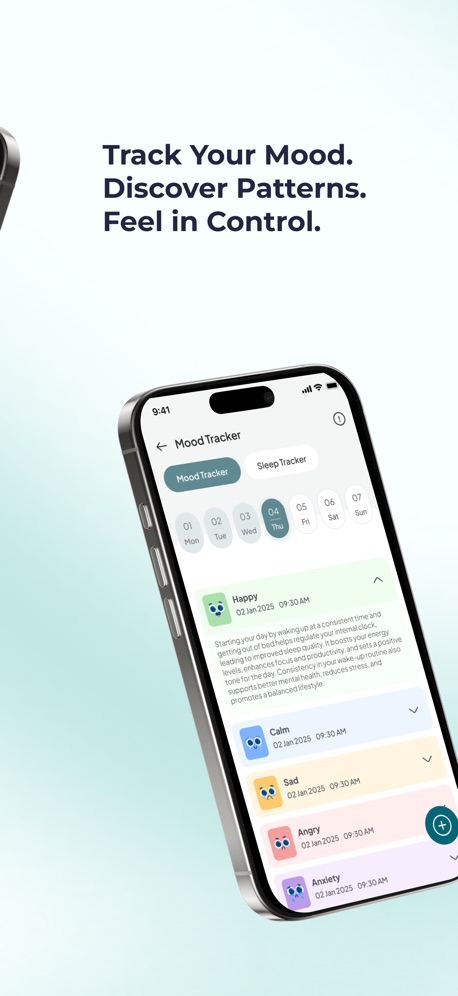
- Mood and sleep tracker with weekly and monthly trends and reports for your doctor or therapist
- Journal with text, voice notes and images
Pros
- Targets the emotions that stop you starting
- Short activities that fit ADHD attention
- One subscription covers 9 conditions, including ADHD and anxiety
Cons
- Not a task manager; keep a simple list app alongside it
Pricing
Free to download with a 7-day free trial, then $49.99/year or $8.99/month (U.S.). Get it on the App Store or Google Play, or learn more at soothfy.com.
Best for
- People who know what to do but can't make themselves do it
- ADHD with anxiety, stress or low mood
- Anyone whose overdue list has become a source of shame


Try Soothfy free for 7 days
2-minute CBT relief for task paralysis and a plan that adapts to your energy.
Free to download · 7-day free trial · soothfy.com


2. TickTick: Closest All-Round Todoist Swap
TickTick does almost everything Todoist does and adds three things ADHD brains often want in one place: a Pomodoro focus timer, a habit tracker and a calendar view. It has a 4.9-star rating from about 47,000 U.S. App Store reviews.
Tasks can be added in plain language, sorted into lists and smart filters, and dragged onto a calendar. Having the timer next to the task removes one more app switch, which matters when switching is where you lose focus.
Key features
- Natural-language task entry
- Built-in Pomodoro timer and focus stats
- Habit tracker
- Calendar views and time blocking
Pros
- Lower price than Todoist Pro
- Timer, habits and tasks in one app
- Free plan doesn't expire
Cons
- Busier interface than Todoist
- Calendar sync and timer stats need Premium
Pricing
Free; Premium $3.99/month or $35.99/year.
Best for
- Todoist users who want a timer and habits built in
- People on a budget
3. Things 3: Calmest Design for Apple Users
Things 3 is known for its clean, quiet design. There are no badges shouting at you, overdue tasks are handled gently, and the Today and Evening views help you see a realistic day. Some people with ADHD find that calm look makes them more willing to open the app.
It's Apple-only (iPhone, iPad, Mac, Apple Watch) and sold as a one-time purchase per device rather than a subscription.
Key features
- Today, Upcoming and Anytime views
- Projects with headings and checklists
- Quick Entry from anywhere on Mac
- Calendar events shown alongside tasks
Pros
- Beautiful, low-stress design
- No subscription
- 4.8 stars from about 28,000 U.S. reviews
Cons
- No Android, Windows or web app
- No built-in timer or collaboration
- Paid separately on iPhone, iPad and Mac
Pricing
$9.99 one-time on iPhone (U.S. App Store); Mac and iPad versions are sold separately.
Best for
- Apple users who feel stressed by busy apps
- People who dislike subscriptions
4. Microsoft To Do: Best Completely Free Option
Microsoft To Do is simple and free, with no premium tier. Its My Day view starts empty every morning and asks you to pick what you'll do today, which keeps the day's list short, a big help for ADHD.
It syncs with Outlook, so flagged emails can become tasks, and works on phone, desktop and web.
Key features
- My Day list that resets daily
- Suggestions from overdue and upcoming tasks
- Outlook integration
- Shared lists
Pros
- Free, with no paywall
- My Day keeps today's list small
- 4.7 stars from about 270,000 U.S. reviews
Cons
- Fewer features than Todoist
- No natural-language dates as smart as Todoist's
- No timer or habits
Pricing
Free.
Best for
- People who want simple and free
- Microsoft 365 users
5. Tiimo: Best Visual Planner for Time Blindness
Todoist shows what to do; Tiimo shows when. It places tasks on a color-coded timeline with icons and a calming focus timer, and its AI co-planner turns a brain dump into a schedule. Its App Store listing says it was named iPhone App of the Year 2025. See our Tiimo alternatives if you want more options.
Key features
- Visual daily timeline
- AI co-planner for brain dumps
- Focus timer and widgets
- Calendar and Reminders sync
Pros
- Designed with ADHD and autism experts
- Makes time visible
Cons
- Best features need Tiimo Pro
- Less suited to large project lists
Pricing
Free plan; Tiimo Pro with a 7-day trial on the yearly plan.
Best for
- People with time blindness
- Visual thinkers
6. Structured: Cheapest Visual Timeline
Structured puts tasks and calendar events on one simple timeline, with an inbox for tasks you haven't scheduled yet. It's a gentle step up from a list if you keep underestimating how long things take. It has 4.8 stars from about 169,000 U.S. reviews. More options: Structured alternatives.
Key features
- Day timeline with icons
- Inbox for unscheduled tasks
- Calendar import
- Recurring tasks
Pros
- Clean and calm
- Low-cost Pro and lifetime options
Cons
- Not built for big projects
- No mood or emotional tools
Pricing
Free; Pro from $9.99/year or $99.99 lifetime (U.S. App Store).
Best for
- People who want a visual day on a budget
7. Amazing Marvin: Most Customizable for ADHD Power Users
Amazing Marvin lets you switch on dozens of optional strategies, including ADHD-specific ones like a procrastination wizard, rewards, time tracking and "Jar of Awesome". You can make it as simple or as complex as you like. Read our honest Amazing Marvin review.
Key features
- Dozens of optional strategies
- Daily planning and time estimates
- Gamification and rewards
- Strong desktop app
Pros
- Can be shaped exactly to your brain
- Built with ADHD users in mind
Cons
- Setup takes time
- No free plan
- Fewer App Store reviews than others
Pricing
$11.99/month or $96/year, per its App Store description.
Best for
- People who enjoy designing their own system
Which Alternative Fits Your Problem?
| If Todoist fails because… | Try |
|---|---|
| My list is too long to face | Microsoft To Do (My Day) or Things 3 |
| I lose track of time | Tiimo or Structured |
| I need a timer to actually start | TickTick |
| I want it free | Microsoft To Do or Google Tasks |
| I want to customize everything | Amazing Marvin |
| I know what to do but freeze or feel overwhelmed | Soothfy |
How to Switch Without Losing Everything
- Export your Todoist projects (Settings, Backups, or each project's export to CSV).
- Don't import everything. Bring over only active projects and tasks due in the next two weeks.
- Archive the rest in a single "Someday" list so it stops shouting at you.
- Use the new app for two weeks before judging it. ADHD brains love novelty, so week two is the real test.
- Pair your list with one tool that helps you start, like a timer or Soothfy's Instant Relief.
Tips to Make Any To-Do App Work With ADHD
- Limit today to three tasks. Everything else goes in a later list.
- Write tasks as first actions. "Open the tax form" beats "Do taxes".
- Add time estimates. Even rough ones help with time blindness.
- Review once a day, briefly. Tie it to an existing habit, like your first coffee.
- Delete without guilt. A task you'll never do is noise.
- Look after the feelings. If you freeze, the fix is usually calming down first. See how to break ADHD task paralysis.

A Quick Look at the ADHD Numbers
About 6% of U.S. adults, roughly 15.5 million people, had a current ADHD diagnosis in 2023, and more than half were diagnosed as adults (CDC, 2024). Many are figuring out for the first time which tools suit their brains, which is why the "perfect" to-do app keeps changing. The National Institute of Mental Health lists difficulty organizing tasks, losing track of time and forgetfulness among common ADHD symptoms, so it makes sense that a plain list isn't enough for everyone.
Key takeaways
- Todoist is excellent, but long lists, time blindness and overdue shame push many ADHD users away.
- TickTick is the closest swap and adds a timer and habits for $35.99/year.
- Tiimo and Structured help if you need to see time, and Microsoft To Do is fully free.
- If the list is fine but you can't start, the problem is emotional: Soothfy helps with 2-minute CBT relief and Anchor Habits.
- Pair one list app with one tool that helps you start.
Final Verdict
For a straight replacement, choose TickTick. For a calmer list, Things 3 or Microsoft To Do. For time blindness, Tiimo or Structured. And if your Todoist is full of tasks you understand but can't make yourself start, add Soothfy, because no list fixes that alone.
More guides: Tiimo Alternatives, Routinery Alternatives, Notion Alternatives for ADHD, ADHD Forgetfulness, The ADHD Tax and Best ADHD Apps for Adults.
Got the list but can't start?
Download Soothfy free and try Instant Relief the next time you freeze.
Free to download · 7-day free trial · soothfy.com
Todoist Alternatives: FAQs (2026)
1. What is the best Todoist alternative for ADHD in 2026?
It depends on why Todoist isn't working. TickTick is the closest swap, with a built-in Pomodoro timer and habit tracker for $35.99 a year. Tiimo and Structured are better if you need to see your day visually. Soothfy is our pick if the list is fine but overwhelm, anxiety or low energy stop you starting.
2. Is there a free Todoist alternative?
Yes. Microsoft To Do and Google Tasks are completely free. TickTick, Tiimo and Structured have free plans, and Soothfy is free to download with a 7-day free trial.
3. How much does Todoist cost in 2026?
Todoist Pro rose on December 10, 2025 to $7 a month, or $5 a month billed yearly ($60/year), according to Todoist's help center. The free plan is still available. App Store subscribers stay on their legacy price.
4. Why do people with ADHD stop using Todoist?
Common reasons are lists that grow too long to face, tasks with no sense of time, too many overdue items that trigger shame, and no help with the emotions that make starting hard.
5. Is TickTick better than Todoist for ADHD?
Many people with ADHD prefer TickTick because it puts a Pomodoro focus timer, habit tracker and calendar view in the same app at a lower price. Todoist has cleaner natural-language entry and stronger integrations.
6. Is Things 3 good for ADHD?
Things 3 is calm and beautifully designed, which some ADHD brains love. It's Apple-only and a one-time purchase ($9.99 on iPhone), with no Android or web version.
7. What is the best visual alternative to Todoist?
Tiimo and Structured show your tasks on a timeline, which helps with time blindness. Structured is the cheaper of the two.
8. Can an app help when I have a to-do list but can't start?
Yes. That's usually an emotional block, not a planning problem. Soothfy's Instant Relief gives you 3 CBT exercises for your exact symptom with a 2-minute timer. Download it on the App Store or Google Play.
9. Can I import my Todoist tasks into another app?
Todoist lets you export projects as CSV, and some apps, like TickTick, can import from Todoist directly. Check the new app's import options before you switch.
10. Should I use one app or two?
Two is usually enough for ADHD: one place to capture tasks and one tool that helps you start them, whether that's a timer, a visual planner or a support app like Soothfy.
11. Do to-do apps replace ADHD treatment?
No. They help with organization, but they don't replace diagnosis, medication or therapy.
Sources
- Todoist: Pro pricing update (December 2025)
- TickTick pricing 2026 (Lifestack)
- Tiimo on the U.S. App Store
- Amazing Marvin on the U.S. App Store
- Things 3 on the U.S. App Store
- NIMH: ADHD, What You Need to Know
This article is for information only and is not medical advice. Prices and features change often; check each app store listing before you buy. Last updated November 14, 2026. Soothfy: soothfy.com