Habit Tracker Alternatives: The Best 7 Habit Apps in 2026
By Soothfy Team ·
Ticking boxes but still not sticking to your habits? Here are the best Habit Tracker alternatives in 2026 and who each one is for.
You set up your habits on a Sunday night: drink water, read 10 pages, meditate, go to bed by 11. For a week, the streaks grow and the checkmarks feel great. Then one bad day breaks the chain, the red X stares back at you, and by the next week you've stopped opening the app.
That's not a willpower problem. Most habit trackers are good at recording what you did, but they don't help on the days when stress, low mood or ADHD make even small habits feel impossible. And if the tracker you love starts asking for a subscription to unlock basic features, that's one more reason to drift away.
In this guide we compare the 7 best alternatives to the Habit Tracker app in 2026: what each one does well, where it falls short, what it costs, and who it's for.
Quick guide: the best Habit Tracker alternatives in 2026
- 🥇 Soothfy: best if stress, low mood or ADHD keeps breaking your habits, with Anchor Habits, a 30-day plan and 2-minute CBT relief
- Streaks: best one-time-purchase habit tracker for iPhone and Apple Watch
- Habitify: best for automatic tracking and detailed stats
- Atoms: best for learning the Atomic Habits method
- HabitKit: best simple, visual habit grid
- Finch: best gentle, game-like self-care habits
- Fabulous: best guided routine journeys
How We Chose These Habit Tracker Alternatives
To build this list, we compared each app's U.S. App Store listing, features and current prices, and read App Store reviews to see what real users like and what frustrates them. We looked for apps that keep what people like about Habit Tracker, simple daily check-offs, reminders and stats, and add something it lacks, from automatic logging to real help on hard days.
Soothfy is our app. Where another app is the better pick for a need, we say so.
- Daily habit tracking with reminders, streaks or progress views, the core of what people use Habit Tracker for
- Clear pricing: we list each app's real U.S. App Store prices
- Clear best use: each app does one thing better than a plain checklist
- Real user reviews from the App Store, October 2026
- Actively updated in 2026
What Are the Best Habit Tracker Alternatives?
Habit Tracker by InnerGrow is a popular, colorful habit planner with Apple Health sync, build and quit habits, group habits, mood tracking and detailed reports. Its Premium plans are listed in the U.S. App Store from $4.99 a month, with yearly and lifetime options, including a $19.99 lifetime membership (October 2026). The best alternatives keep the simple daily loop and fix what makes people quit: one missed day that wipes out motivation, too many habits at once, and no help when mood or energy is low. Some focus on clean tracking, some on the science of habits, and some on the mental health side of sticking with them. Here's how they compare at a glance.
Habit Tracker Alternatives Compared
| App | Best for | Price (U.S.) |
|---|---|---|
| 🥇 Soothfy | Anchor Habits + 30-day plan + CBT relief + mood tracking | Free download · 7-day trial · $49.99/yr |
| Streaks | One-time purchase, Apple Watch | $5.99 one-time |
| Habitify | Automatic tracking + stats | Free plan · Plus and Pro tiers |
| Atoms | Atomic Habits method | Free · $4.99/mo or $39.99/yr |
| HabitKit | Simple visual habit grid | Free · Pro from $0.99/mo or $14.99 lifetime |
| Finch | Gentle self-care habits with a pet | Free · Finch Plus from $5.99 |
| Fabulous | Guided routine journeys | Free · Premium from $19.99 |
Prices: U.S. App Store listings, October 2026. They vary by country, plan and offer.
The 7 Best Habit Tracker Alternatives in 2026
1. Soothfy: Best Overall When Stress, Low Mood or ADHD Keeps Breaking Your Habits


Soothfy is a mental health app with habits built in, for people whose routines fall apart when stress, anxiety, low mood or ADHD take over. Like Habit Tracker, it gives you daily habits, reminders and progress you can see. The difference is that it works on why habits break: Anchor Habits tie each new habit to something you already do, a personalized 30-day plan adapts to your mood and energy, and when a hard moment hits, Instant Relief gives you CBT exercises so one bad day doesn't end the whole routine.
Key features
- Anchor Habits: attach small habits to your morning, work and evening routines, the habit-stacking method that makes new habits easier to remember.
- Personalized 30-day plan: a 2-minute check-in builds a daily plan around your goals, and it adapts on low-energy days instead of piling on more.

- Instant Relief: pick your exact symptom from 35 options and get 3 CBT exercises with a 2-minute timer. You mark what worked, so Soothfy learns what helps you get back on track.
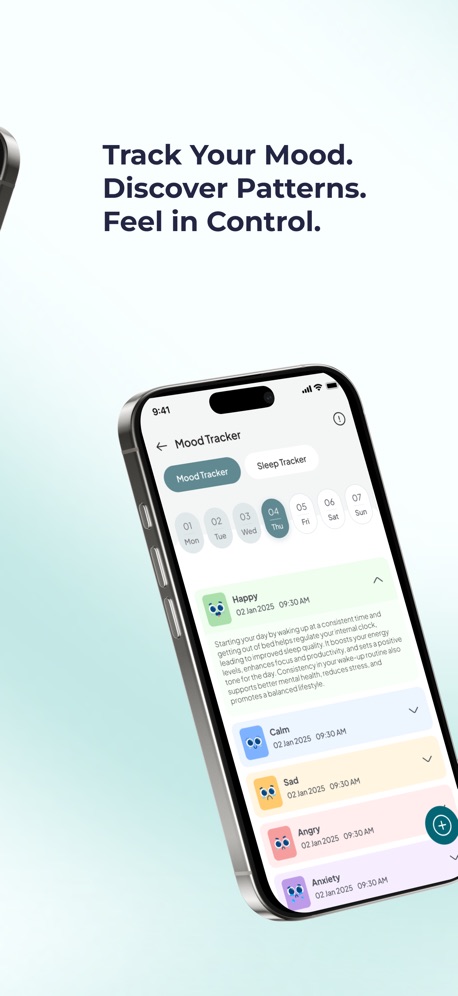
- Mood and sleep tracker: log mood and sleep in seconds and see how your habits, stress and sleep connect, with weekly and monthly trends and reports you can share with your doctor.
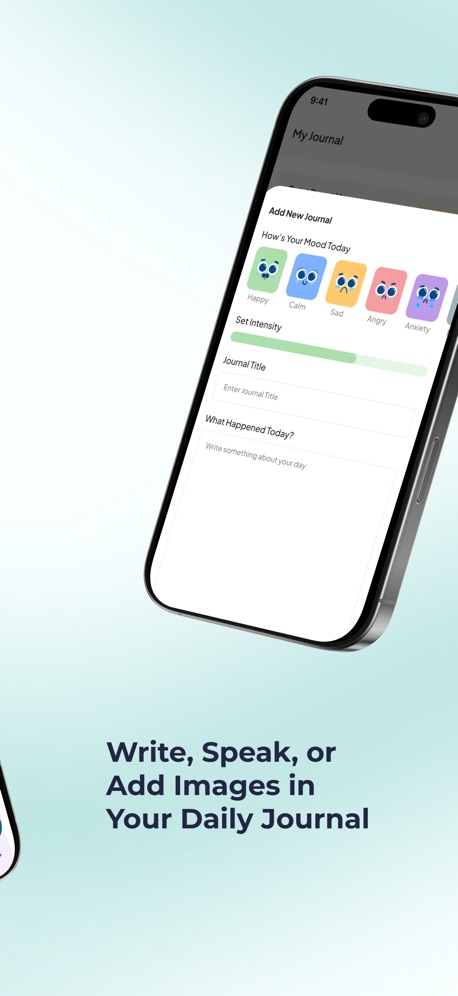
- Journal: write, record a voice note or add images to reflect on what's working and what isn't.
- One subscription for 9 conditions, including ADHD, anxiety, depression and stress, plus sound therapy, a CBT library and a moderated community.
Pros
- Habits tied to your real routine, not a long checklist
- A plan that adapts to your mood and energy
- Help in the moment when stress or overwhelm would break your streak
- Clear 7-day free trial, then $49.99/year
Cons
- Not a pure checkbox tracker with hundreds of icons and themes, so keep Streaks or HabitKit if that's all you want
Pricing
- Free to download with a 7-day free trial
- $49.99/year or $8.99/month (U.S.)
Suitable for
- People who start habits easily but can't keep them going
- Anyone whose routines fall apart with stress, low mood or ADHD
- People who want habits, mood tracking and mental health tools in one app
How to start
- Download Soothfy free on iPhone or Android.
- Take the 2-minute assessment.
- Pick one Anchor Habit for your morning, and use Instant Relief the next time a hard day threatens your routine.
What users say
"This app is so helpful and I noticed great improvements after just a few days! All of the trackers and reminders help me so much!"
App Store review (U.S.)
Habits that survive bad days
Anchor Habits, a 30-day plan and 2-minute CBT relief in one app. Free for 7 days.
Free to download · 7-day free trial


2. Streaks: Best One-Time-Purchase Habit Tracker for iPhone and Apple Watch

Streaks is a to-do list that helps you form good habits, and it's one of the most polished habit trackers on iPhone. Made by Crunchy Bagel, it won an Apple Design Award. You can track up to 24 tasks a day and build a streak of consecutive days for each one. It links to the Health app, so things like steps, water or mindful minutes can complete themselves, and its Apple Watch app is one of the best in the category.
Compared with Habit Tracker, Streaks has no subscription: it's a single $5.99 purchase in the U.S. App Store (October 2026). You also get negative tasks for breaking bad habits, timed tasks, daily notes and shared tasks so a friend can keep you accountable. The tradeoff is that it's Apple-only and very focused on streaks, so a broken chain can still feel discouraging.
Our take: choose Streaks if you want a clean, reliable tracker on iPhone and Apple Watch and you'd rather pay once than subscribe.
Key features
- Up to 24 daily tasks with streaks
- Apple Health integration for automatic completion
- Negative tasks to break bad habits
- Timed tasks and daily notes
- Shared tasks for accountability
- Widgets, 78 color themes and 600+ icons

Pros
- One-time purchase, no subscription
- Excellent Apple Watch app
- Simple and fast to use every day

Cons
- iPhone, iPad, Mac and Apple Watch only
- Focus on streaks can feel harsh after a missed day
- No help with mood, stress or motivation
Pricing
- $5.99 one-time purchase (U.S. App Store)
Suitable for
- Apple users who want a premium tracker without a subscription
How to start
- Buy Streaks, add 3 tasks you already do most days, and link one to the Health app so it completes itself.
What users say
"Streaks seems to hit that perfect balance between simplicity and functionality"
App Store review (U.S.)
3. Habitify: Best for Automatic Tracking and Detailed Stats

Habitify has been around since 2016 and says it has helped more than 3 million people form over 20 million habits. Its big strength is automatic tracking: with your permission, it logs progress from Apple Health, Google Health, Fitbit, Strava, Screen Time and RescueTime, so walking, sleeping, reading or cutting screen time can count without you opening the app.
Compared with Habit Tracker, Habitify leans further into data. It has charts, streaks, milestones, morning, afternoon and evening routines, and it now works with AI assistants through its API, MCP and Siri, so you can log habits or ask about your progress in plain language. In 2026 it moved to Free, Plus and Pro tiers: Plus removes the habit limit, and Pro adds advanced insights and Apple Health sync. Some long-time users have complained in reviews about widget changes after updates.
Our take: choose Habitify if you want your fitness and screen-time apps to log habits for you, and you like digging into stats.
Key features
- Automatic logging from Apple Health, Fitbit, Strava and Screen Time
- Morning, afternoon and evening routines
- Charts, streaks and milestones
- AI assistant support through API, MCP and Siri
- iPhone, iPad, Apple Watch, Mac and Android

Pros
- Saves effort with automatic tracking
- Detailed progress insights
- Works on Apple and Android devices

Cons
- Free plan has limits; unlimited habits need Plus
- Best insights and Health sync are in Pro
- Some users dislike recent widget changes
Pricing
- Free plan
- Habitify Plus and Habitify Pro subscriptions (see the U.S. App Store for current prices)
Suitable for
- People who track fitness or screen time and want habits logged automatically
How to start
- Download Habitify, connect Apple Health or Google Health, and add one habit that it can track automatically, like steps.
What users say
"After trying a couple of habit tracker apps, I've landed on Habitify and it's my favorite of the bunch."
App Store review (U.S.)
4. Atoms: Best for Learning the Atomic Habits Method

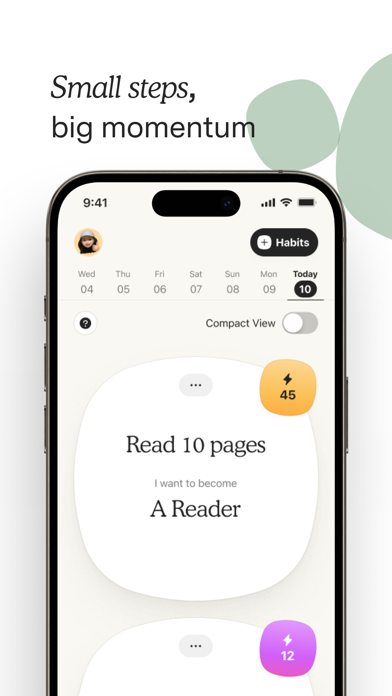
Atoms is the official app from Atomic Habits, the best-selling book by James Clear. It's not only a tracker: it guides you through creating habits based on the kind of person you want to become, helps you start at the right size, and asks you to commit to a time and place. Short lessons teach the book's four laws of habit change, making habits obvious, attractive, easy and satisfying, in about five minutes a day.
Compared with Habit Tracker, Atoms is calmer and more focused. Logging a habit is a satisfying press-and-hold that makes your atom grow, and the app puts identity before streaks. It has fewer customization options and integrations, and some reviewers feel it's overpriced for what it offers. Atoms Pro is listed at $4.99 a month or $39.99 a year in the U.S. App Store (October 2026), and the free version covers basic tracking.
Our take: choose Atoms if you loved the book and want an app that teaches you the method, not just one that counts checkmarks.
Key features
- Guided habit creation based on identity
- Time-and-place commitments
- Bite-sized lessons from Atomic Habits
- Satisfying press-and-hold logging
- Focus sessions
- Calendar view of your progress
Pros
- Teaches a proven habit method
- Calm, motivating design
- Free version for basic tracking

Cons
- Fewer integrations than Habitify
- Some users find Pro overpriced
- Less help on low-mood or high-stress days
Pricing
- Free
- Atoms Pro $4.99/month or $39.99/year (U.S. App Store)
Suitable for
- Atomic Habits readers who want to put the book into practice
How to start
- Download Atoms, create one habit around the person you want to become, and set a time and place for it.
What users say
"The interface of the app is calming and simple in the best way."
App Store review (U.S.)
5. HabitKit: Best Simple, Visual Habit Grid

HabitKit turns your habits into a colorful grid of tiles, one square for every day you show up, a bit like a GitHub contribution chart. That visual history is the whole idea: when your grid looks good, you don't want to stop. You can track yes-or-no habits, count reps like glasses of water, or measure amounts in your own units, with flexible schedules such as a number of times per week.
Compared with Habit Tracker, HabitKit is simpler and more minimal, and its home screen widgets let you check off habits without opening the app. It also handles quitting habits gently: every day counts as clean until you log a slip, and you can set a daily maximum, like two coffees, instead of going cold turkey. HabitKit Pro is cheap, with U.S. App Store prices from $0.99 a month and lifetime options from $14.99 (October 2026). Some users wish it had account sync across devices and iOS Reminders integration.
Our take: choose HabitKit if you want a beautiful, low-pressure tracker that shows your progress at a glance.
Key features
- Colorful habit grid with daily tiles
- Yes/no, count and amount tracking
- Flexible schedules (per week or month)
- Quit habits with clean-day streaks and daily limits
- Home and Lock Screen widgets
- Shortcuts support

Pros
- Very visual and motivating
- Affordable Pro and lifetime options
- Gentle approach to quitting habits

Cons
- Mostly tracking; no coaching or plan
- Some users want better sync across devices
- No mood or stress tools
Pricing
- Free
- HabitKit Pro from $0.99/month, yearly from $5.99, lifetime from $14.99 (U.S. App Store, several prices listed)
Suitable for
- Visual thinkers who want a simple, beautiful tracker
How to start
- Download HabitKit, add one habit, and put its widget on your home screen so you see the grid every day.
What users say
"I have ADHD and this app really helps me stay motivated and manage my executive dysfunction"
App Store review (U.S.)
6. Finch: Best Gentle, Game-Like Self-Care Habits

Finch is a self-care app built around a virtual pet. You set small goals, check in on your mood and complete short exercises, and each one gives your bird energy to go on adventures. It's one of the most popular self-care apps on the App Store, and many users with depression, anxiety or ADHD say it finally got them doing basic habits like taking meds or making the bed.
Compared with Habit Tracker, Finch is far gentler. There are no harsh broken streaks: if you miss a day, your pet is simply waiting when you come back. Goals can be as tiny as "get out of bed," and the app can suggest them for you. The tradeoff is less detail: you won't get the deep stats, Health sync or group habits Habit Tracker offers, and for some people the game becomes the goal. Finch Plus is listed at several prices in the U.S. App Store, from $5.99 to $69.99 (October 2026).
Our take: choose Finch if strict trackers make you feel guilty and you need a kind, playful nudge. Read our honest Finch review.
Key features
- Virtual pet that grows with your self-care
- Small daily goals, suggested or your own
- Morning and evening mood check-ins
- Journaling prompts and breathing exercises
- iPhone and Android

Pros
- No guilt when you miss a day
- Generous free version
- Makes tiny habits feel rewarding

Cons
- Less detailed tracking and stats
- The game can distract from progress
- Several Finch Plus prices can be confusing
Pricing
- Free
- Finch Plus listed from $5.99 to $69.99 (U.S. App Store, several plans)
Suitable for
- People who find regular habit trackers stressful or boring
How to start
- Download Finch, name your bird, and set three tiny goals for tomorrow.
What users say
"I was bedridden for a while because of mental health things and couldn't even get out of bed. I downloaded this app and something about taking care of this bird motivated me."
App Store review (U.S.)
7. Fabulous: Best Guided Routine Journeys

Fabulous started as a habit tracker and grew into a self-improvement and coaching app. Instead of a blank list, it guides you through journeys that add one small step at a time, starting with something as easy as drinking a glass of water in the morning, then building a full morning, afternoon and evening routine. It also has a daily planner, coaching series, gratitude journal, short workouts, breathing exercises and live challenges with other members.
Compared with Habit Tracker, Fabulous gives you much more structure and motivation, which reviewers with ADHD often mention as the reason it worked for them. The tradeoff is cost and complexity: most of the journeys and coaching sit behind Premium, which is listed at several prices in the U.S. App Store, from $19.99 up to $59.99 a year (October 2026), and there's more content than some people want if they only need to tick off a few habits.
Our take: choose Fabulous if you want someone to guide you step by step through building a routine, not just a place to record it.
Key features
- Guided habit journeys that start small
- Morning, afternoon and evening routines
- Daily planner and to-do list
- Coaching series and affirmations
- Gratitude journal and short workouts
- Live community challenges

Pros
- Lots of structure and motivation
- Starts with very small, doable steps
- Rich coaching content

Cons
- Most journeys need Premium
- Several Premium prices can be confusing
- Can feel like a lot if you only want a simple tracker
Pricing
- Free
- Premium listed from $19.99 to $59.99 (U.S. App Store, several plans)
Suitable for
- People who want a coach-like guide to build a full daily routine
How to start
- Download Fabulous, pick the first journey, and complete just the first small habit for three days.
What users say
"it starts with baby steps to ensure that you get a feeling of success and then builds upon those feelings"
App Store review (U.S.)
Final Thoughts
Habit Tracker is a colorful, capable planner, but if your habits keep falling apart after a few good weeks, a different kind of app may help more than a different checklist. Soothfy is our top pick if stress, low mood or ADHD keeps breaking your routine: Anchor Habits tied to your day, a 30-day plan that adapts to your energy, 2-minute CBT relief for hard moments, and mood and sleep tracking. For a one-time purchase on iPhone, choose Streaks. For automatic logging and stats, Habitify. For the Atomic Habits method, Atoms. For a simple visual grid, HabitKit. For gentle motivation, Finch, and for guided routines, Fabulous.
More guides: Honest Finch Review, Finch App Alternatives, Me+ Alternatives, Bearable Alternatives, Daylio Alternatives, ADHD Morning Routine, How to Break Out of a Depression Spiral and Best Anxiety Relief Apps.
Try Soothfy free for 7 days
The Habit Tracker alternative that helps your habits survive bad days.
Free to download · 7-day free trial
Best Habit Tracker Alternatives: FAQs (2026)
1. What is the Habit Tracker app?
Habit Tracker by InnerGrow is a daily planner and habit tracker for iPhone with Apple Health sync, build and quit habits, flexible goals, group habits, mood tracking, reminders, widgets and weekly, monthly and yearly reports. It says it has more than 15 million users.
2. How much does Habit Tracker cost?
Habit Tracker is free to download. In the U.S. App Store, its Premium options are listed from $4.99 a month, with yearly plans and a $19.99 lifetime membership, plus other offers (October 2026).
3. What is the best alternative to Habit Tracker?
Soothfy is the best Habit Tracker alternative if stress, low mood or ADHD keeps breaking your habits. It combines Anchor Habits and a personalized 30-day plan with 2-minute CBT relief and mood and sleep tracking. For a simple tracker you pay for once, Streaks is the closest match on iPhone.
4. Is there a free habit tracker without a subscription?
Several apps have free versions, including HabitKit, Atoms, Finch and Habitify's free plan, each with limits. Streaks has no subscription at all: it's a one-time $5.99 purchase in the U.S. App Store.
5. Which habit tracker is best for ADHD?
People with ADHD often do best with habit apps that keep things small, visual and forgiving. Soothfy is built for ADHD brains, with Anchor Habits tied to routines you already have, a plan that adapts to your energy and quick help when overwhelm hits. HabitKit and Finch are also popular with ADHD users.
6. Why do I keep quitting habit trackers?
Most people quit because one missed day breaks a streak, they start with too many habits, or stress and low mood make habits feel impossible. Starting with one small habit, attaching it to something you already do and having a plan for bad days makes it far more likely to stick.
7. What is habit stacking?
Habit stacking means attaching a new habit to one you already do, like "after I pour my coffee, I'll take my meds." It's a core idea in Atomic Habits. Soothfy's Anchor Habits use the same approach, linking habits to your morning, work and evening routines.
8. How long does it take to build a habit?
It varies a lot. A widely cited study from University College London found it took participants anywhere from 18 to 254 days to make a new behavior automatic, with a median of about 66 days. Missing one day did not make a real difference to forming the habit.
9. Is Streaks worth it?
If you use an iPhone and Apple Watch and want a polished, simple tracker without a subscription, Streaks is worth the one-time price. It's not available on Android.
10. Does Habitify work on Android?
Yes. Habitify works on iPhone, iPad, Apple Watch, Mac and Android, and can log habits automatically from Apple Health, Google Health, Fitbit, Strava and Screen Time with your permission.
11. Is Atoms the official Atomic Habits app?
Yes. Atoms is the official app based on Atomic Habits by James Clear. It teaches the book's method through short lessons and guided habit creation. Atoms Pro is listed at $4.99 a month or $39.99 a year in the U.S. App Store (October 2026).
12. Can a habit tracker help with anxiety or depression?
A habit tracker can help you keep small, healthy routines like walking, sleep and time outside, which support mental health. It isn't a treatment. Soothfy adds CBT exercises, mood tracking and a daily plan for anxiety and depression. If symptoms last more than two weeks or affect daily life, talk to a doctor or therapist.
13. Can I track mood and habits in the same app?
Yes. Habit Tracker, Finch and Soothfy all include mood tracking. Soothfy tracks mood and sleep together and shows how they connect with your habits, with reports you can share with your doctor.
14. How do I cancel a Habit Tracker subscription?
On iPhone, go to Settings, tap your name, then Subscriptions, and choose the plan to cancel. Deleting the app does not cancel the subscription. A lifetime purchase does not renew, so there is nothing to cancel.
Ready for habits that stick?
Download Soothfy free and set your first Anchor Habit today.
Free to download · 7-day free trial
This article is for information only and is not medical advice. Prices and features change often. Last updated October 23, 2026.