Best Akiflow Alternatives in 2026: 7 Planner and Time Blocking Apps Compared
By Soothfy Team ·
Akiflow too expensive? We compare the 7 best Akiflow alternatives in 2026 for daily planning, time blocking and AI scheduling, with real prices.
Akiflow promises to end task chaos. Emails, Slack messages, Notion pages and calendar invites all flow into one inbox, and you drag them onto your calendar to build a realistic day. For busy professionals juggling many tools, it can feel like finally having one source of truth.
But at $34 a month, or
9 a month billed yearly (Carly), it's one of the most expensive personal planners, and its keyboard-driven style takes time to learn. This guide compares the 7 best Akiflow alternatives in 2026, from close rivals to free options.
Quick answer: the best Akiflow alternatives in 2026
🥇 Soothfy: best for following through on your plan, with 2-minute CBT relief and Anchor Habits
Sunsama: closest alternative, with guided daily planning
Motion: best for AI auto-scheduling
Reclaim.ai: best AI scheduling with a free plan
Todoist: best budget task manager
TickTick: best value all-in-one
Structured: best visual day planner
About Soothfy (who wrote this)
This guide is written by the team behind Soothfy, a mental health app for ADHD, anxiety, depression, stress, insomnia, OCD, PTSD, panic attacks and addictive habits. Soothfy is our product, so we say clearly where another app is the better pick. Download Soothfy on the App Store or Google Play.
Akiflow Alternatives Compared
App
Planning style
Price (U.S.)
🥇 Soothfy
Habits + follow-through
$49.99/yr (free trial)
Sunsama
Guided daily planning
7/mo yearly · $22/mo
Motion
AI auto-scheduling
$29/mo yearly · $49/mo
Reclaim.ai
AI in your calendar
Free plan · paid plans
Todoist
Task list + calendar
Free · $60/yr
TickTick
All-in-one
Free · $35.99/yr
Structured
Visual timeline
Free · from $9.99/yr
Akiflow (for reference)
Universal inbox + time blocking
9/mo yearly · $34/mo
Prices from official pages, Carly and Lifestack, checked November 2026.
What Akiflow Does Well
Universal inbox pulling tasks from many tools
Drag-and-drop time blocking onto your calendar
Daily planning ritual
Fast keyboard shortcuts for power users
Calendar consolidation across accounts
Why People Look for an Akiflow Alternative
Price. $228 a year billed yearly, more if monthly.
Card required for the trial.
Learning curve. It rewards keyboard power users.
Overkill for personal life. Many features are built for work.
Planning isn't the bottleneck. A perfect plan doesn't help if you can't start.
How We Chose
Each app covers task capture, daily planning or time blocking
Cheaper and free options included
Prices checked against official sources in November 2026
Soothfy is our app and isn't a planner. If you need a direct replacement, Sunsama is the closest match.
The 7 Best Akiflow Alternatives in 2026
1. Soothfy: Best for Following Through on Your Plan
Akiflow is built for people drowning in tasks from a dozen tools: it pulls them into one inbox so you can plan your day properly. But a perfect plan doesn't help if, at 2 p.m., you're staring at the next time block feeling too overwhelmed or anxious to start. Soothfy works on that moment.
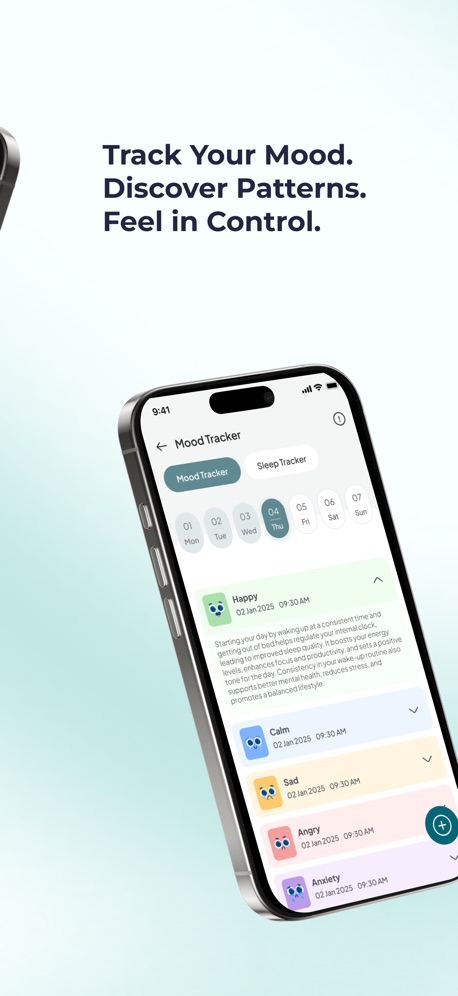
Instant Relief lets you tap your exact symptom, like overwhelm or dread, and gives you 3 CBT exercises with a 2-minute timer. A personalized 30-day plan of 2- to 5-minute activities, tied to Anchor Habits, builds the start-of-day and end-of-day rituals that make any planner stick. And the mood and sleep tracker shows how energy shifts across your week, so you can plan around it.
Compared with Akiflow: Akiflow organizes your work; Soothfy helps you feel able to do it. Pair Soothfy with a cheaper planner and you'll still pay far less than Akiflow.
Key features
Instant Relief: pick your exact symptom, like overwhelm or a racing mind, and get 3 CBT exercises with a 2-minute timer
Personalized 30-day plan of 2- to 5-minute activities that adapts to your mood and energy
Anchor Habits: new habits tied to routines you already do, like making coffee
Mood and sleep tracker with weekly and monthly trends and reports for your doctor or therapist
Journal with text, voice notes and images
Pros
Helps you start, not just schedule
Builds daily planning rituals
About a fifth of Akiflow's yearly price
Cons
Not a task inbox or calendar
Pricing
Free to download with a free trial, then $49.99/year or $8.99/month (U.S.). Get it on the App Store or Google Play, or learn more at soothfy.com.
Best for
People who plan well but don't follow through
ADHD with overwhelm or anxiety
A plan that adapts to youStart with a 2-minute check-in
Plans are easy. Starting is hard.
Try Soothfy free: 2-minute CBT relief and habits that help you follow through.
Sunsama is Akiflow's closest rival: integrations that pull in tasks, guided daily planning, workload warnings and a shutdown ritual. It's calmer and more intentional, and slightly cheaper. See our Sunsama alternatives.
Compared with Akiflow: Gentler guided planning, slightly lower price; Akiflow is faster for keyboard power users.
Motion schedules your tasks for you, fitting them around meetings and reshuffling as things change. It has grown into a broader AI workspace with projects and docs. See our Motion alternatives.
Compared with Akiflow: AI places your tasks instead of you dragging them; more expensive.
Key features
AI auto-scheduling
Projects and docs
Meeting booking
Pros
Removes daily planning decisions
Cons
Expensive
Plans move often
Pricing
Pro AI $29/month billed yearly or $49/month (Carly).
Best for
People who want AI to decide when
4. Reclaim.ai: Best AI Scheduling With a Free Plan
Reclaim.ai adds smart scheduling to Google Calendar and Outlook, automatically finding time for tasks, habits and focus time and defending it as your week changes. It has a free plan, which makes it an easy place to start.
Compared with Akiflow: Works inside your calendar with AI, with a free plan, but no universal inbox.
Key features
AI task and habit scheduling
Focus time protection
Smart meeting links
Pros
Free plan
Keeps your existing calendar
Cons
Desktop-focused
Pricing
Free plan; paid plans available (see Reclaim's pricing page).
Best for
People who live in Google Calendar or Outlook
5. Todoist: Best Budget Task Manager
Todoist won't time block for you, but with its calendar integration and fast task entry, you can recreate much of Akiflow's workflow for a fraction of the price. It has 4.8 stars from about 131,000 U.S. App Store reviews. See our Todoist alternatives for ADHD.
Compared with Akiflow: Much cheaper and very reliable, but manual planning.
Key features
Natural-language tasks
Email forwarding
Calendar integration
Pros
Cheap and stable
Cons
No built-in time blocking
Pricing
Free; Pro $7/month or $5/month billed yearly (Todoist).
Best for
People who want a dependable, low-cost system
6. TickTick: Best Value All-in-One
TickTick combines tasks, calendar views, a Pomodoro timer and habits for $35.99 a year, with 4.9 stars from about 47,000 U.S. reviews. See our TickTick alternatives.
Compared with Akiflow: Far cheaper with more built-in tools, but fewer work integrations.
Key features
Tasks and calendar
Time blocking by drag and drop
Pomodoro timer
Habits
Pros
Great value
Cons
Fewer integrations
Pricing
Free; Premium $3.99/month or $35.99/year (Lifestack).
Best for
People who want features without the price
7. Structured: Best Visual Day Planner
Structured places tasks and calendar events on a single day timeline, making it easy to see if your plan fits. It has 4.8 stars from about 169,000 U.S. reviews. More: Structured alternatives.
Compared with Akiflow: Personal visual planning instead of a work inbox, at a tiny fraction of the price.
Key features
Visual timeline
Inbox
Calendar import
Pros
Very cheap
Calm
Cons
No work integrations
Pricing
Free; Pro from $9.99/year or $99.99 lifetime (U.S. App Store).
Best for
Personal planning on a budget
Yearly Cost Comparison
App
Approximate yearly cost (U.S.)
Motion Pro AI
$348
Akiflow
$228
Sunsama
$204
Todoist Pro
$60
Soothfy
$49.99
TickTick Premium
$35.99
Structured Pro
From $9.99
Reclaim.ai
Free plan available
Annual billing where available, November 2026.
Recreate Akiflow's Workflow for Free
One inbox: forward important emails and messages to a single task list (Todoist and TickTick both support email forwarding).
Morning review: after your first coffee, pick three tasks.
Block them: drag each into a calendar slot, hardest first.
Leave buffer: keep a third of your free time unplanned.
Shut down: move unfinished tasks to tomorrow at the end of the day.
Anchor steps 2 and 5 to habits you already have. That's the idea behind Soothfy's Anchor Habits.
Your personal goalsMood + sleep tracker
Manual Time Blocking vs AI Scheduling
Manual (Akiflow, Sunsama, TickTick)
AI (Motion, Reclaim.ai)
Who decides when
You
The algorithm
Daily effort
5–10 minutes of planning
Little, once tasks are set up
Predictability
High: you chose each block
Lower: blocks move automatically
Good for ADHD when…
Choosing helps you commit
Decision fatigue stops you planning
Watch out for
Skipping the planning step
Ignoring a plan that keeps changing
If you've tried Akiflow and found yourself skipping the morning planning step, AI scheduling may help. If you found it calming to choose your own blocks, stay manual and pick a cheaper tool.
Signs Your Planning System Is Too Complex
You spend more time organizing tasks than doing them
Your inbox keeps growing faster than you can clear it
You avoid opening the app because it feels overwhelming
You rebuild your system every few weeks
You feel guilty every time you look at your calendar
If that sounds familiar, simplify: one list, three tasks a day, one time block for the hardest one. Productivity tools should reduce stress, not add to it. Our guide to ADHD task paralysis can help when the list itself feels too heavy.
Who Should Stick With Akiflow
Akiflow is still a strong choice if you genuinely receive tasks from many tools every day, love keyboard shortcuts, and will use the daily planning ritual most mornings. For everyone else, a simpler or cheaper option often works just as well.
Key takeaways
Akiflow costs 9/month billed yearly or $34/month, with a 7-day trial that needs a card.
Sunsama is the closest alternative; Motion and Reclaim.ai offer AI scheduling, with Reclaim's free plan.
Todoist, TickTick and Structured give you much of the workflow for far less.
If you plan well but struggle to start, Soothfy helps with 2-minute CBT relief and Anchor Habits.
Final Verdict
For the closest swap, choose Sunsama. For AI scheduling, Motion or Reclaim.ai. For value, TickTick or Todoist. For visual personal planning, Structured. And if your plans are fine but your follow-through isn't, add Soothfy.
Sunsama is the closest alternative for guided daily planning and time blocking. Motion is best for AI auto-scheduling, Reclaim.ai for AI scheduling with a free plan, and Todoist or TickTick for cheaper task management. Soothfy is our pick if you plan well but struggle to follow through.
2. How much does Akiflow cost?
Akiflow costs $34 a month billed monthly or 9 a month billed yearly ($228/year), with a 7-day free trial that requires a card, according to Carly.
3. Is there a free Akiflow alternative?
Reclaim.ai has a free plan, and Todoist, TickTick, Structured and Microsoft To Do have free plans. Soothfy is free to download with a free trial.
4. Is Sunsama cheaper than Akiflow?
Slightly. Sunsama costs 7 a month billed yearly or $22 monthly, according to Carly's September 2026 check.
5. What is a universal inbox?
A universal inbox pulls tasks from email, Slack, Notion, calendar and other tools into one list. It's Akiflow's signature feature, and Sunsama offers similar integrations.
6. What is time blocking?
Time blocking means scheduling tasks into specific calendar slots, so you plan when you'll do each thing, not just what.
7. Is Akiflow good for ADHD?
Its single inbox can reduce the stress of tasks scattered across apps, and time blocking helps with time blindness. The price and learning curve are common drawbacks.
8. Which alternative is best for a whole team?
Motion and Todoist both offer team plans. Akiflow and Sunsama are mainly built for individuals.
9. Can I use Akiflow's ideas for free?
Yes. Forward important emails to one task list, review it each morning, and drag your top three tasks into your calendar. That's the core of the method.
10. What if I plan my day but don't follow it?
That's usually about energy, overwhelm or anxiety rather than planning. Soothfy's Instant Relief gives you 3 CBT exercises with a 2-minute timer; download it on the App Store or Google Play.
This article is for information only and is not medical advice. Prices and features change often; check each provider's website or app store listing before you buy. Last updated November 22, 2026. Soothfy: soothfy.com