Best Motion App Alternatives in 2026: 7 AI Planners and Calendars Compared
By Soothfy Team ·
Motion too expensive? We compare the 7 best Motion alternatives in 2026, from AI schedulers with free plans to calm, cheap planners for ADHD.
Motion promised to end planning: tell it your tasks and deadlines, and AI fits everything into your calendar, reshuffling automatically when a meeting runs over. For decision-tired brains, that sounds perfect.
In practice, many people leave. Motion Pro AI now costs $29 a month billed yearly or $49 monthly (Carly), the product has grown into a broader AI workspace, and a plan that keeps moving can feel unsettling, especially with ADHD or anxiety. This guide compares the 7 best Motion alternatives in 2026, from AI schedulers to calm, cheap planners.
Quick answer: the best Motion alternatives in 2026
🥇 Soothfy: best when the schedule isn't the problem, with 2-minute CBT relief and Anchor Habits
Reclaim.ai: closest AI scheduling alternative, with a free plan
Akiflow: best for manual time blocking with integrations
Sunsama: best for a calm, guided daily plan
Structured: cheapest visual planner
Tiimo: best visual planner for ADHD
Todoist: best budget task manager
About Soothfy (who wrote this)
This guide is written by the team behind Soothfy, a mental health app for ADHD, anxiety, depression, stress, insomnia, OCD, PTSD, panic attacks and addictive habits. Soothfy is our product, so we say clearly where another app is the better pick. Download Soothfy on the App Store or Google Play.
Motion Alternatives Compared
App
Planning style
Price (U.S.)
🥇 Soothfy
Habits + support to follow through
Free download · 7-day trial · $49.99/yr
Reclaim.ai
AI scheduling in your calendar
Free plan · paid plans
Akiflow
Manual time blocking
9/mo yearly · $34/mo
Sunsama
Guided daily planning
7/mo yearly · $22/mo
Structured
Visual timeline
Free · from $9.99/yr
Tiimo
Visual + AI co-planner
Free · Pro with trial
Todoist
Task list + calendar
Free · $60/yr
Motion (for reference)
AI auto-scheduling + workspace
$29/mo yearly · $49/mo
Prices from official pages and U.S. App Store listings, checked November 13, 2026.
Why People Leave Motion
Price. At $348 a year for Pro AI, it's one of the most expensive planners.
A moving plan. Constant reshuffling can make it hard to trust or remember the schedule.
Feature creep. Motion has added projects, docs and AI agents, which is more than many individuals need.
Trial requires billing details. Some people don't want to enter a card just to try it.
Scheduling isn't the bottleneck. If you avoid tasks because of stress, a better schedule won't help.
How We Chose
Covers at least one thing Motion does: AI scheduling, time blocking, daily planning or task management
Cheaper and ADHD-friendly options included
Prices checked against official pages in November 2026
Soothfy is our app. If AI scheduling is what you need, Reclaim.ai is the closer match.
The 7 Best Motion Alternatives in 2026
1. Soothfy: Best When the Schedule Isn't the Problem
Motion can fill your calendar perfectly. But for many people with ADHD or anxiety, a perfect schedule still leads to the same afternoon: staring at the next block, feeling overwhelmed, and doing something else. Soothfy works on what happens when you reach that block.
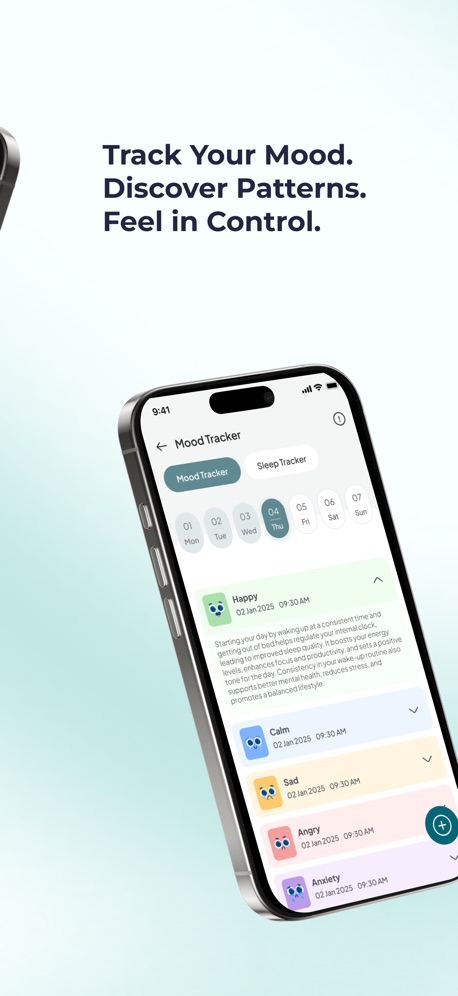
Instant Relief lets you pick your exact symptom (overwhelm, dread, a racing mind) and gives you 3 CBT exercises with a 2-minute timer. A personalized 30-day plan of 2- to 5-minute activities tied to Anchor Habits builds small daily routines, and the mood and sleep tracker shows how your energy changes so you can plan around it.
Compared with Motion: Motion decides when to work; Soothfy helps you actually start. At $49.99 a year, it costs about a seventh of Motion Pro AI.
Key features
Instant Relief: pick your exact symptom, like overwhelm or a racing mind, and get 3 CBT exercises with a 2-minute timer
Personalized 30-day plan of 2- to 5-minute activities that adapts to your mood and energy
Anchor Habits: new habits tied to routines you already do, like making coffee
Mood and sleep tracker with weekly and monthly trends and reports for your doctor or therapist
Journal with text, voice notes and images
Pros
Helps you start, not just schedule
Fraction of Motion's price
Covers ADHD, anxiety, burnout-related stress and more
Cons
No calendar or AI scheduling; pair with a free planner
Pricing
Free to download with a 7-day free trial, then $49.99/year or $8.99/month (U.S.). Get it on the App Store or Google Play, or learn more at soothfy.com.
Best for
People who schedule well but don't follow through
ADHD with anxiety or stress
Start with a 2-minute check-inA plan that adapts to you
Try Soothfy free for 7 days
2-minute CBT relief and habits that help you follow through.
Reclaim.ai adds AI scheduling to Google Calendar and Outlook. It automatically finds time for tasks, habits like lunch or exercise, focus time and meetings, and defends that time as your week changes. It has a free plan, which makes it the easiest way to try AI scheduling.
Compared with Motion: Works inside your existing calendar instead of replacing it, with a free plan and lower paid tiers.
Key features
AI task and habit scheduling
Focus time protection
Smart meeting links
Google Calendar and Outlook
Pros
Free plan
Keeps your existing calendar
Cons
Less of an all-in-one workspace
Best on desktop
Pricing
Free plan; paid plans available (see Reclaim's pricing page).
Best for
People who want AI scheduling without switching calendars
3. Akiflow: Best for Manual Time Blocking With Integrations
Akiflow pulls tasks from email, Slack, Notion and more into one inbox, then lets you drag them onto your calendar yourself. You keep control of the plan, which some ADHD users prefer to a constantly moving AI schedule.
Compared with Motion: You plan by hand instead of AI, at a lower price.
Key features
Universal inbox
Drag-and-drop time blocking
Daily planning ritual
Pros
Brings scattered tasks together
More predictable plan
Cons
Still pricey
Learning curve
Pricing
9/month billed yearly or $34/month; 7-day trial (Carly).
Best for
Professionals juggling many tools
4. Sunsama: Best for a Calm, Guided Daily Plan
Sunsama guides you through planning each day, warns you when you've planned too much, and ends with a shutdown ritual. It's calmer and more intentional than Motion. See our Sunsama alternatives.
Compared with Motion: Intentional manual planning with workload warnings, at a lower price.
Structured shows your tasks and calendar events on a simple day timeline. There's no AI scheduling, but you can see at a glance whether your day fits. It has 4.8 stars from about 169,000 U.S. App Store reviews. More: Structured alternatives.
Compared with Motion: No AI and no work integrations, but nearly free.
Key features
Visual timeline
Inbox
Calendar import
Pros
Very cheap
Calm design
Cons
Manual planning only
Pricing
Free; Pro from $9.99/year or $99.99 lifetime (U.S. App Store).
Best for
Personal planning on a budget
6. Tiimo: Best Visual Planner for ADHD
Tiimo's AI co-planner turns a brain dump into a visual day plan, designed with ADHD and autism experts. It's a gentler kind of AI planning than Motion. Its App Store listing says it was named iPhone App of the Year 2025. More: Tiimo alternatives.
Compared with Motion: Lighter AI help focused on personal planning, far cheaper.
Key features
AI co-planner
Visual timeline
Focus timer and widgets
Pros
Built for neurodivergent brains
Cons
Not for complex work projects
Pricing
Free plan; Tiimo Pro with a 7-day trial on the yearly plan.
Best for
People with time blindness
7. Todoist: Best Budget Task Manager
Todoist plus your calendar covers most of what people use Motion for, if you're happy to schedule by hand. It's fast, reliable and cheap. See our Todoist alternatives for ADHD.
Compared with Motion: No auto-scheduling, but a fraction of the price.
Key features
Natural-language tasks
Calendar integration
Projects and filters
Pros
Cheap and reliable
Cons
No time blocking built in
Pricing
Free; Pro $7/month or $5/month billed yearly.
Best for
People who want a simple, cheap system
AI Scheduling vs Planning Yourself
AI scheduling (Motion, Reclaim)
Planning yourself (Sunsama, Akiflow, Structured)
Decision fatigue
Low: AI decides
Higher: you decide daily
Predictability
Lower: plan moves
Higher: you know why each block is there
Setup time
Moderate: tasks need durations and deadlines
Low to moderate
Cost
Free (Reclaim) to $348+/year
Free to about $228/year
Best for ADHD when…
Planning itself is the barrier
You need a plan you trust and remember
A Free 5-Minute Alternative to AI Scheduling
Check your calendar. How many hours are actually free today?
Pick three tasks. Add 50% to each time estimate.
Block them. Put each into a calendar slot, hardest task in your best hours.
Leave buffer. Keep a third of your free time unplanned.
Shut down. At the end of the day, move unfinished tasks to tomorrow.
Anchor this to something you already do, like your first coffee, and it becomes automatic. That's the idea behind Soothfy's Anchor Habits.
Your personal goalsMood + sleep tracker
Yearly Cost at a Glance
App
Approximate yearly cost (U.S.)
Motion Pro AI
$348
Akiflow
$228
Sunsama
$204
Todoist Pro
$60
Soothfy
$49.99
Structured Pro
From $9.99
Reclaim.ai
Free plan available
Annual billing where available, November 2026.
What Motion Does Well
It's worth being fair to Motion. Its auto-scheduler genuinely removes the daily question of "what should I do next?", it reschedules automatically when meetings move, and it combines tasks, projects, meetings and docs for teams. If decision fatigue is what stops you, and the price isn't a problem, Motion can work. The alternatives below are for people who want something cheaper, calmer or more focused on personal life.
Signs AI Scheduling Isn't Working for You
You stop checking the calendar because it keeps changing
Tasks get pushed later and later without you noticing
You feel anxious when you see a fully packed day
You spend more time adjusting task durations than doing tasks
You still avoid the same tasks, just at their new scheduled times
If several sound familiar, try a manual planner for two weeks. Many people with ADHD find that choosing their own three tasks each morning builds more commitment than accepting a schedule an algorithm made.
Planning With ADHD: What Actually Helps
About 6% of U.S. adults, roughly 15.5 million people, had a current ADHD diagnosis in 2023 (CDC, 2024), and difficulty organizing tasks and managing time are among the most common symptoms. The tools that help most usually share a few traits:
Fewer decisions, through templates, short lists or AI help
Visible time, through timelines, timers or calendar blocks
A start ritual anchored to an existing habit
Kindness on bad days: a lighter plan rather than a list of failures
Support for the emotions that make starting hard, like dread, overwhelm and shame
No single app does all five. Most people do best with one planner and one support tool, for example Structured plus Soothfy, for far less than Motion alone.
Moving Off Motion
List your active projects and deadlines before cancelling.
Move only tasks due in the next two weeks to your new app.
Recreate recurring habits, like exercise or lunch breaks, as calendar events or Anchor Habits.
Cancel Motion before the next billing date; check your account for the renewal day.
Key takeaways
Motion Pro AI costs $29/month billed yearly or $49 monthly, and has grown into a broad AI workspace.
Reclaim.ai is the closest AI scheduler and has a free plan.
Akiflow and Sunsama suit people who want to plan by hand; Structured and Tiimo are the cheapest visual options.
If scheduling isn't your real problem, Soothfy helps you follow through with 2-minute CBT relief and Anchor Habits.
Final Verdict
For AI scheduling at a lower price, choose Reclaim.ai. For manual time blocking, Akiflow or Sunsama. For visual planning on a budget, Structured or Tiimo. And if your schedule is fine but you still can't start, choose Soothfy.
Reclaim.ai is the closest AI scheduling alternative and has a free plan. Akiflow and Sunsama are best if you'd rather plan by hand. Structured and Tiimo are the cheapest visual planners. Soothfy is our pick if your real problem is stress and overwhelm, not scheduling.
2. How much does Motion cost in 2026?
Motion Pro AI costs $29 a month billed yearly ($348/year) or $49 billed monthly, and Business AI costs $39 or $69, according to Carly's September 2026 pricing check. The free trial requires billing details.
3. Is there a free Motion alternative?
Reclaim.ai has a free plan for AI scheduling. Structured, Tiimo, Todoist and Microsoft To Do have free plans. Soothfy is free to download with a 7-day free trial.
4. Is Motion good for ADHD?
Some people with ADHD love handing scheduling decisions to AI. Others find a plan that constantly reshuffles stressful, and the price is high. If decision fatigue is your main problem, it's worth a trial.
5. What is AI auto-scheduling?
AI auto-scheduling tools look at your tasks, deadlines and calendar, then place tasks into free time slots for you, moving them when meetings change.
6. Is Reclaim.ai better than Motion?
Reclaim focuses on smart calendar scheduling for habits, tasks and meetings inside Google or Outlook Calendar, and has a free plan. Motion is a broader workspace with projects and docs, at a higher price.
7. Is Akiflow cheaper than Motion?
Yes. Akiflow costs about 9 a month billed yearly or $34 monthly, versus $29 or $49 for Motion Pro AI.
8. What's the cheapest Motion alternative?
Structured has a free plan and Pro from $9.99 a year or $99.99 lifetime. Microsoft To Do and Google Tasks are completely free.
9. Do I need AI to plan my day?
No. A 5-minute morning routine of choosing three tasks and blocking time in your calendar gets you most of the benefit for free.
10. What if I schedule tasks but still don't do them?
That's usually about energy, anxiety or overwhelm. Soothfy helps with 2-minute CBT relief and Anchor Habits. Download it on the App Store or Google Play.
This article is for information only and is not medical advice. Prices and features change often; check each app store listing before you buy. Last updated November 17, 2026. Soothfy: soothfy.com